Bromcom: Unable to change staff absence end times

Staff List Page>Choose Staff>Actions>Add Absence (and creating absence via Staff Profile page) How to Record Staff Absence – Bromcom – Documentation Centre

You may find, when entering a Staff Absence, whether you select specific time (eg half day, 3/4 day) the time changes to a default time.
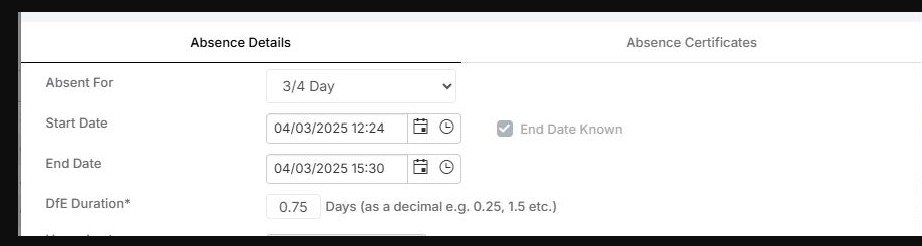
In order to rectify this, you need to set the absence to “1 or more days ” and absence type “continuous days” .  You are then able to add a more specific start time and end time.

If you are selecting the other options for absence set it will look at the period structure for the school.


How useful was this article?

Click on a star to rate it!

Average rating / 5. Vote count:

No votes so far! Be the first to rate this post.

Similar Posts

  • BROMCOM: Devon County Council- Key Stage Upload dates

    The following dates have been provided by the Devon Data and Assessment Team. For further information please contact below Tel: 01392 287317 Email: Schooldataassessment@devon.gov.uk Your Key Stage CTF’s must be uploaded via Devon Transfer by the following dates. EYFS Deadline – 30th June 2025 Phonics- 23rd June 2025 (Please include Year 1 and Year 2…

  • Bromcom: How do I add part time schedules for nursery students

    To add Part Time schedules for Nursery students go to Modules > Attendance > Routines > Bulk Attendance Update. You can then select whether you would like to update attendance for individual Students, Class/Groups or Teachers. Then select the Student/s, Class/Group/s or Teacher/s to update by either typing the name in the box or using the Search option by clicking on the Magnifying Glass icon. The Selection List will then…

  • Adding Pupil Premium to your MIS

    Arbor ‘Pupil Premium Eligible’ in Arbor is an indicator of whether a student may be eligible for Pupil Premium based on their background, such as being in receipt of Free School Meals. The Pupil Premium tag may not be a true representation of who actually receives Pupil Premium funding in the school (shown by the…

  • Bromcom Finance & DTSApps – DEVON SCHOOLS

    Bromcom Finance: How to process your invoices, in Central Authorisation and “Print & Export” DTSApps – Bromcom Integration Guidance Bromcom Finance: Raising orders on suppliers websites for example: YPO & Amazon Bromcom Finance: How to cancel “Passed for Pay” Invoices Bromcom Finance: I have clicked print and not print and export Bromcom Finance and DTSApps:…

  • Autumn School Census 2025 – Bulletin

    This FAQ lists the latest information regarding the School Census.  For Schools wanting the latest documentation for Census and using Bromcom – Click here  to jump to the relevant section. For Schools wanting the latest documentation for Census and using Arbor –  Click here  to jump to the relevant section. For Schools wanting the latest documentation for…

  • BROMCOM: How to create a Key Stage DFE assessment CTF

    How to create a Key Stage DFE assessment CTF’s EYFS – Please check with your LA. If you are a Devon school-Upload to Devon Transfer Phonics – Please check with your LA. If you are a Devon school- Upload to Devon Transfer (Please note: For Devon this is a combined CTF with all Year 1’s and…