Bromcom Finance: How do I add a Fund code?
Modules> Finance> Homepage> Maintenance>Fund Codes
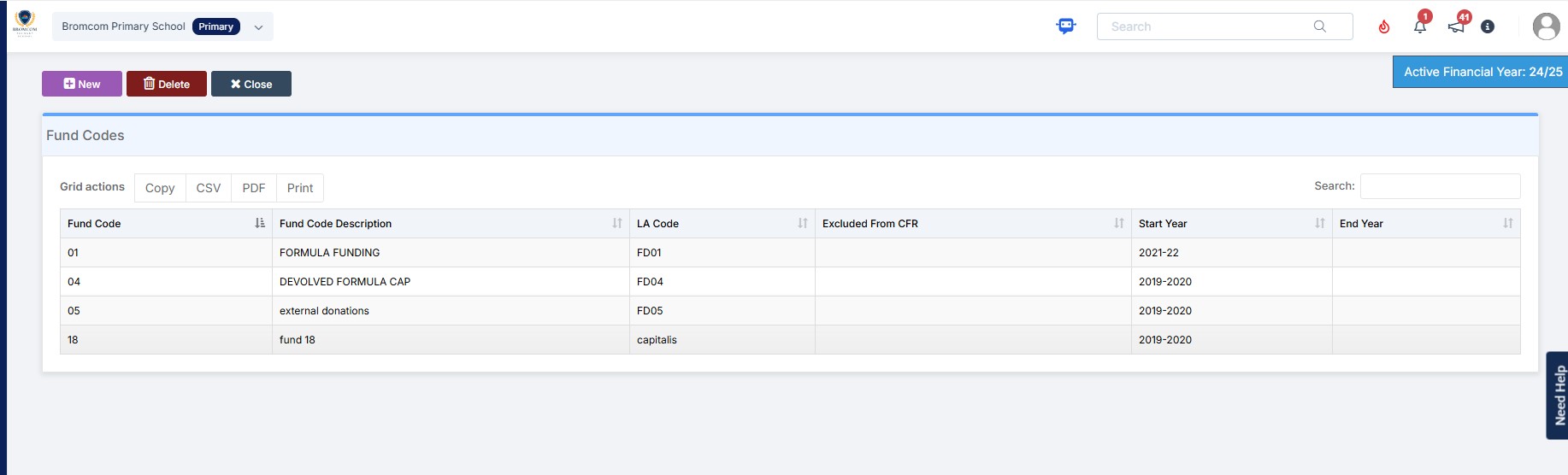
Click New as shown in the below screen shot to create your chosen fund code
Please also see guidance on Fund allocation How to allocate Funds
Modules> Finance> Homepage> Maintenance>Fund Codes
Click New as shown in the below screen shot to create your chosen fund code
Please also see guidance on Fund allocation How to allocate Funds
How useful was this article?
Click on a star to rate it!
Average rating / 5. Vote count:
No votes so far! Be the first to rate this post.
There is no excerpt because this is a protected post.
Switching on the display of hidden and system folders.
For Key Stage Assessments after you have access via BROMCOM: How to add ‘Configurations’ to a Role for Key Stage – Frequently Asked Questions Go to Config > Assessment > Configurations and put the tick in Enable Sheet Users. You can then tick which Staff Roles will require access to the marksheets…
Modules >MCAS>View Orders Click Create Order, select student and click the plus button for “Process Instalments or Part–Paid” You will then see the below screen shot, where you can select the trip or club Click Add to order and click next and click create order and pay now selecting the method of payment E.G Cash…
Your email settings can be viewed under Config > Setup > System Settings. If you have not used Email functionality, you will need to ensure the settings are entered as per the below instructions, and click the Save button in the top left of the screen. Despite the warning, the ability to send emails is…
To bulk update class memberships go to Modules > Curriculum > Bulk Group Assignment The drop-down menu allows you to choose Class, Tutor Group, Band and Block In this example I am setting the Art students in Year 8 Next to the Group Name click the Magnifying glass and choose the required classes. Click Done….