School Workforce Census Bulletin 2025
This FAQ lists the latest information regarding the School Workforce Census. It contains links to relevant documentation for Arbor and Bromcom.
School Workforce Census Date: Thursday 6th November 2025
School Workforce Census Deadline Date to DfE: Friday 21st November 2025 (If you are a maintained school please consult your LA)
Latest Census Information
| KNOWN ISSUES | Please check back on regular basis – Known issues will be posted here |
| 3/12/2025 | BROMCOM – Query 4521 Pay Framework is missing
Please follow the steps below to resolve this query, if it is flagging when the data is showing correctly:
2) Go back into the contract base pay structure (eg Leadership) and changed the pay framework back to Pay framework 2014 and click Save. 3) Generate a new census and the query should clear. PLEASE NOTE – if you are a LA maintained school – PLEASE DO NOT upload a new file as the team have been working on your file. |
| 02/12/2025 | BROMCOM – Additional Payments duplicated in XML file
Bromcom have confirmed that there is an issue with additional payments duplicating in the census XML file. They are working on a solution but this will not be resolved for this year’s census. They have advised that schools will need to amend in COLLECT. Devon Maintained Schools – the census team are working with affected schools Academies – please amend in COLLECT. Other LA maintained schools – speak to your census team For instructions on how to do this please see this guide – How to identify the addition payments in The School Workforce Census on COLLECT |
| 27/11/2025 | BROMCOM KNOWN ISSUES
For a compete list of Bromcom known issues, including 4521Q, please see this guide Bromcom SWC Known Issues
|
| 26/11/2025 | BROMCOM SWC KNOWN ISSUE – Please see update from Bromcom below:
There is currently an issue with the School Workforce Census that results in the incorrect Arrival Date being returned for staff within the census file if the staff member has previously worked at the school, left the school, and then returned, such that their initial start date is returned as their Arrival Date in the census file, due to the way that start dates can be recorded on staff records in Bromcom. This is incorrect as the DfE require that a staff member’s most recent start date be returned in the census file instead. In order to rectify this you can edit the affected staff members’ arrival dates on the COLLECT website when submitting your School Workforce Census. Please note that this is unlikely to affect a vast majority of your staff, only those that have worked at your school during multiple separate periods. Our software team are working on restructuring the Staff Records in Bromcom to allow for this to be handled seamlessly in the future, however this is a long term development and will not be ready in time for the current School Workforce Census . Thank you for your understanding. |
| 2/0/11/2025/ | BROMCOM Schools Workforce census – duplicate additional allowances
There may be an issue with additional allowances duplicating on the census XML file, please check your census files before uploading to COLLECT. This appears to be affecting staff with contracts with multiple roles – eg Teacher and SENCo. |
| 6/11/25 | BROMCOM SWC Common Queries – please see below some common queries we have received
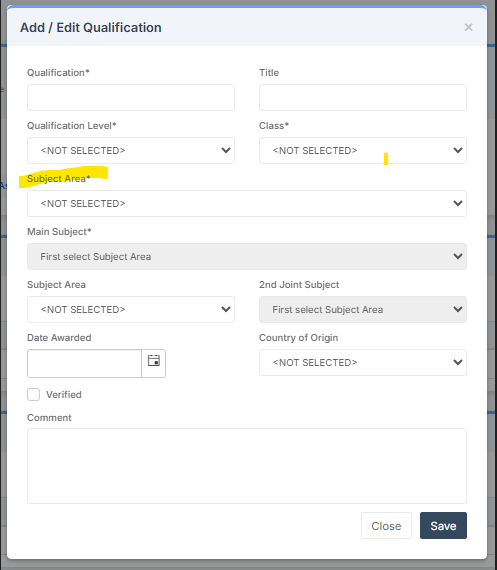
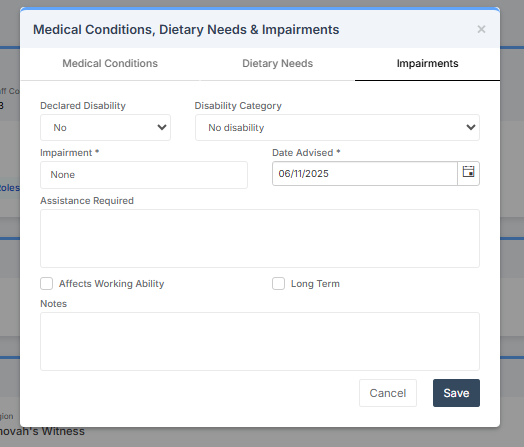
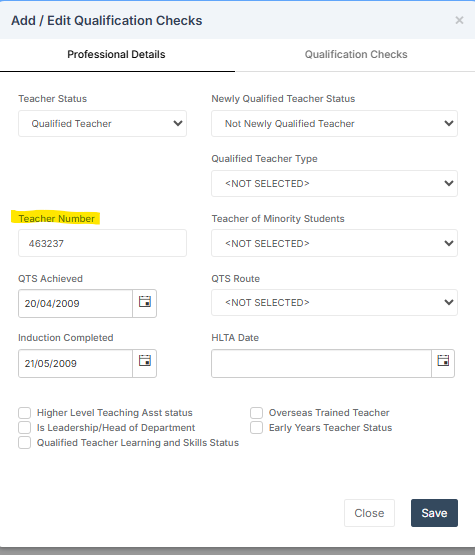
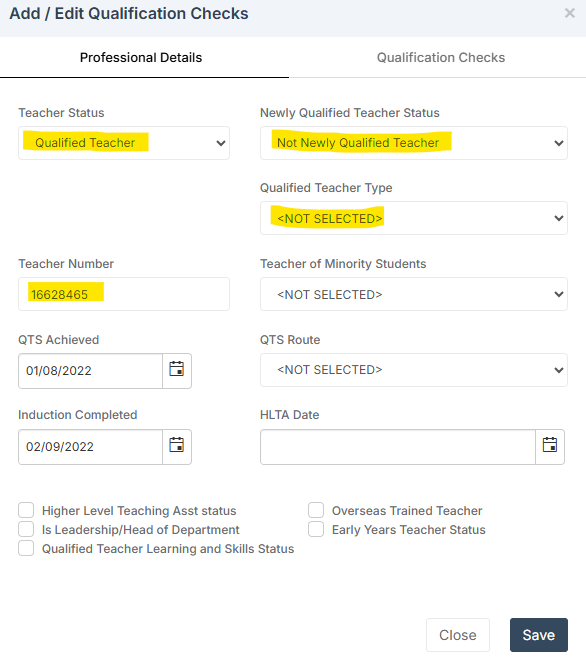
Error 6220 – Subject code is invalid – Go to Staff record > Qualifications (on the left) and open the qualifications – ensure that the ‘Subject area’ contains an appropriate subject Query 4226Q – Please check: Staff member started more than 3 months previously but Disability Status has not been obtained. Staff members can refuse to provide the information, but it should be asked for. Refusal should be recorded as ‘Refused’ (REFU), not as ‘Information not yet obtained’ Go to Staff Record – Medical Conditions, Dietary Needs & Impairments and click on the + icon. Information needs to be entered in the Declared Disability, Disability Category, Impairment and Date Advised fields, please see example below (if you need guidance on what should be entered, please refer to the DfE). Query 4105 – Teacher number should be 7 or 8 digits. Go to Staff profile > Background Check (on the left hand side) > Qualification Checks, add or edit the Teacher Number (do not include the /). Query 4470Q – Qualified Teacher Status inconsistent with Pay range type From within the staff record you will need to go to the background check tab and scroll to the Qualification Checks area. Double click on open the Add/Edit Qualification checks screen. You will then need to populate the fields highlighted below with the relevant information |
| 21.10.2025 | Bromcom have confirmed the SWC is now available to run. |
| 17.10/2025 | As per Bromcom census guidance here , it states that the SWC is not available to run as they are awaiting DfE validation files. The guide will be updated when it is ready to run.
IMPORTANT: Please note the 2025 SWF Census is NOT YET available to run, generating a Census before the file is available to run may cause incorrect errors and queries. |
DFE Documentation:
- DFE School Workforce Guide – School Employed Staff
- DfE School Workforce Guide – Centrally Employed Staff
- COLLECT guides for schools and LA – minimum notepad entries
Arbor Guides and Help
Currently 2024 guidance – will be updated when available
Bromcom Guides and Help
- Bromcom 2025 SWC census main page – This guide also contains links to sign up for webinars or to watch a webinar recording.
- Bromcom 2025 School Workforce Census Guide
- Bromcom 2025 School Workforce Error Resolutions Guide