|

Bromcom : How do I pay cash into an instalment based trip ?

Modules >MCAS>View Orders

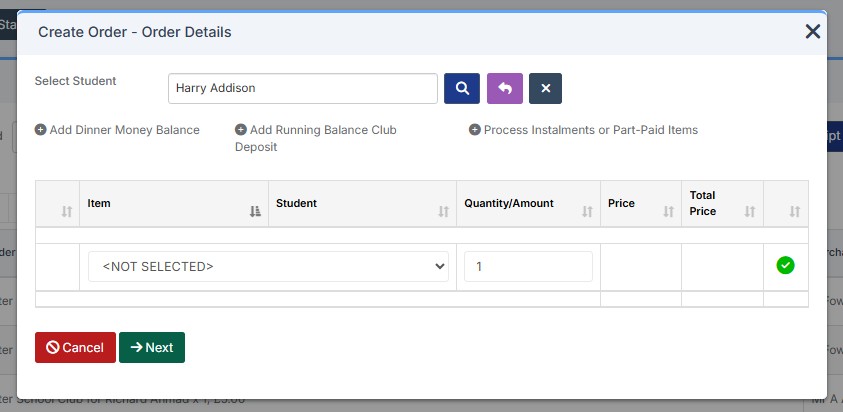
  1. Click Create Order, select student and click  the plus button for “Process Instalments or Part–Paid”
  2. You will then see the below screen shot, where you can select the trip or club
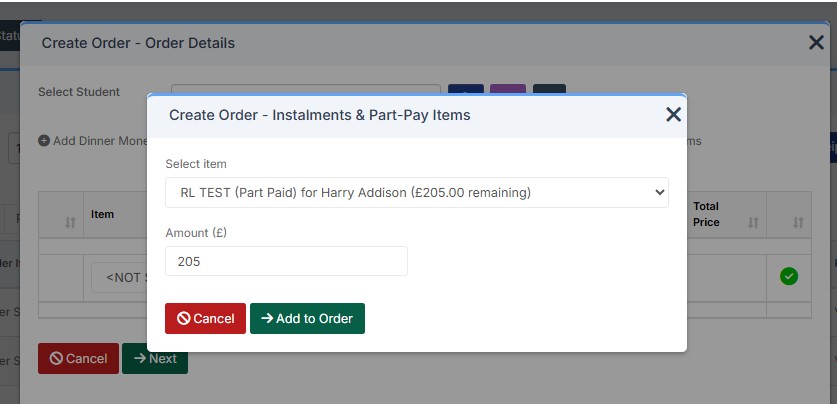
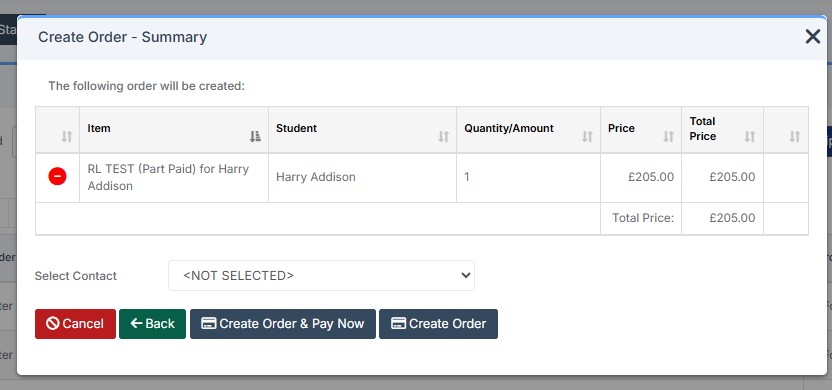
  3. Click  Add to order and click next  and click create order and pay now selecting the method of payment E.G Cash
 

How useful was this article?

Click on a star to rate it!

Average rating / 5. Vote count:

No votes so far! Be the first to rate this post.

Similar Posts

  • BROMCOM: How to Add Staff to Edit/View Marksheets

    For Key Stage Assessments after you have access via BROMCOM: How to add ‘Configurations’ to a Role for Key Stage – Frequently Asked Questions Go to Config > Assessment > Configurations and put the tick in Enable Sheet Users.         You can then tick which Staff Roles will require access to the marksheets…

  • Bromcom Finance: How to cancel “Passed for Pay” Invoices

    There are a couple of reasons you might need to cancel your raised “Passed for Pay” Invoices: If you have lost your “Print and export” text file that is required for processing through DTSApps, you will need to cancel your invoices and re-raise them.  If you have raised an invoice and now no longer require…

  • Bromcom Finance and DTSApps: How do I process my Petty cash file – DEVON SCHOOLS

    Navigate to Modules> Finance> Homepage> General ledger> Petty Cash Processing. 1) Click the yellow button to add an expenditure or green button to add a reimbursement 2) Add your expense lines on the right hand side VAT Reg Numbers Note : When adding multiple lines of expenditure, please remove the VAT Reg number if not…

  • Bromcom Finance & Budgeting : How do I enter a Variance reason in Budget Variances

    Modules> Finance> Homepage> Budgeting> Budget Variances In the budget variances you can add a budget variance reason against e.g a Cost centre as shown in this example below: Note: Any Variance reason needs to be added before you sort your columns – see sorting columns FAQ – Bromcom Finance & Budgets: How do I sort…

  • Bromcom Finance & DTSApps – DEVON SCHOOLS

    Bromcom Finance: How to process your invoices, in Central Authorisation and “Print & Export” DTSApps – Bromcom Integration Guidance Bromcom Finance: Raising orders on suppliers websites for example: YPO & Amazon Bromcom Finance: How to cancel “Passed for Pay” Invoices Bromcom Finance: I have clicked print and not print and export Bromcom Finance and DTSApps:…

  • BROMCOM: EYFS Key Stage Return

    EYFS is for every child in the final term of the year in which they reach age 5 Please contact your LA for deadline date or see here if you are a Devon County Council school- BROMCOM: Devon County Council- Key Stage Upload dates – Frequently Asked Questions For more information please read the following…