How do I get rid of all of the markups in Word?

Ensure that the Reviewing section is showing in the options at the top of the screen.
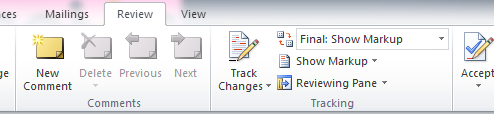
wordmarkups

You can either click on the arrows to go through each one to check you are happy with the change and then click on the tick or the cross. If you are happy to get rid of all of them, click on the down arrow to the right of the tick and select ‘Accept all changes in document’


Reviewed on 08/04/2016

KB4520

How useful was this article?

Click on a star to rate it!

Average rating / 5. Vote count:

No votes so far! Be the first to rate this post.

Similar Posts

  • Can I set a password on an Excel Spreadsheet? (Excel 2010)

    Before setting the password it is important to remember that if you lose or forget the password, it cannot be recovered.  Also remember that passwords are case sensitive. Click the File Button , click Save As, and on the bottom of the Save As dialog, click Tools. On the Tools menu, click General Options. Under File…

  • LogMeIn Resolve – Requirements

    Remote access offers enhanced customer satisfaction, greater efficiency with regards to resolving your issues on first contact and providing our highest level of support when investigating problems. System Requirements for End users These hardware, operating system, and browser requirements apply to your end users’ computers. Recommendations for network configurations are made to ensure a smooth…

  • How do I open an Elevated Command Prompt?

    I need to run a Command Prompt as a an administrator, how do I open an Elevated Command Prompt? There will need to be a user that has Administrative rights associated with the machine. Type cmd.exe into the search box on the Start menu. Right click on it and choose Run As or Run As…

  • Common text file types

    Text file types

    .doc – Microsoft Word Document – Automatically selected when saving in Word 2003