| |

How do I open an Elevated Command Prompt?

I need to run a Command Prompt as a an administrator, how do I open an Elevated Command Prompt?

There will need to be a user that has Administrative rights associated with the machine.

Type cmd.exe into the search box on the Start menu.

Right click on it and choose Run As or Run As Administrator for Windows 7 users
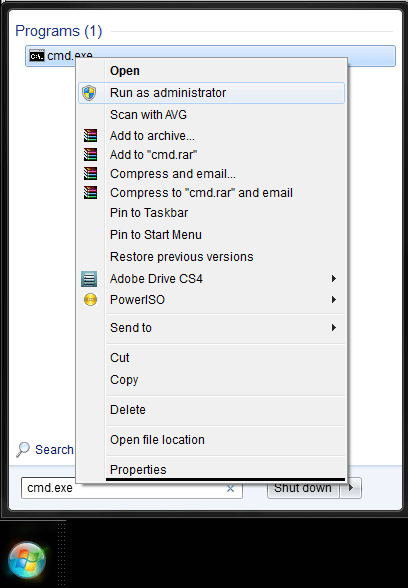
Run As

Choose ‘The following user’ option and enter a User name and password of the User that has administrative rights.

It will then open the Elevated Command Prompt box
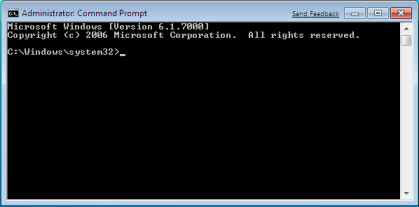
Elevated Command Prompt

How do I open an Elevated Command Prompt?


Reviewed 23/02/2015

How useful was this article?

Click on a star to rate it!

Average rating / 5. Vote count:

No votes so far! Be the first to rate this post.

Similar Posts

  • How to Restart the Print Spooler | Cannot delete print job

    Sometimes a print job gets stuck in the queue; the school users can’t delete it themselves etc. You may need to restart the Printer Spooler Service on the curriculum server (or which computer is hosting the printer) and to delete the offending file. The Following should be done by whomever is responsible for Curriculum network: Remote into…

  • Mac will not access the App Store and secure websites

    If you are not able to access App Store, iTunes or any HTTPS websites on your Mac while in school but you are able to open normal (HTTP) websites its likely you will need to set the proxy for Secure Web Sites: Open System Settings Click on Network Select your active network connection  (WiFi or Ethernet) and…

  • Adding SWGfL Proxy Settings to mobile devices (iPad, iPhone, Android)

    Add SWGfL proxy server settings to my iPad or iPhone 1. Navigate to the ‘Settings’ app and tap on ‘WiFi’ 2. Next, tap on the WiFi network you need to add the proxy to. This should be one you are currently connected to. 3. This next page will display all of your network information, for the network you…

  • Windows – Map network drive for Admin F & G drives

    How to Map a Network Drive in Windows You can map a network drive in Windows to give yourself quick access to shared folders on a server. Follow the steps below to set this up. Make sure you have the correct login details To access a shared folder on a server, you’ll need: A user…