|

Bromcom Finance & DTSApps – How do I edit the fund code in DTSApps – DEVON SCHOOLS

Scenario : My fund code for “Trial Balance” is mapped  to Fund 2 instead of Fund 3

  1. Log into DTSApps
  2.  From the menu on the left at the bottom, click School settings> Click the Fund Codes tab and select the fund code and click pencil button to edit the code
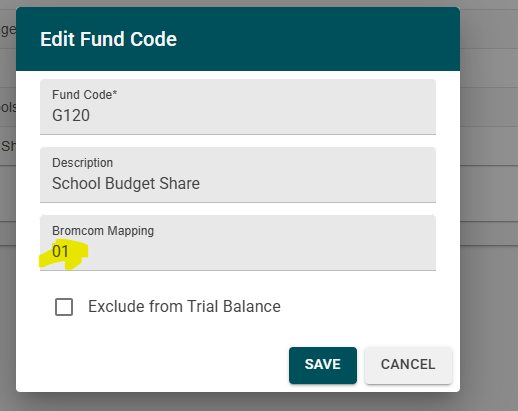

3. If you need to add the fund code also into Bromcom, please go to Modules> Finance>Homepage> Maintenance> Fund codes E.G Fund 3 for G121

How useful was this article?

Click on a star to rate it!

Average rating / 5. Vote count:

No votes so far! Be the first to rate this post.

Similar Posts

  • Bromcom: Why can’t I add a new room to Exams?

    In order for a room to appear within Exams it must first be added in Config > Administration > Rooms Once it has been added here you will then need to go to Config > Examination > Exam Rooms and click New. You will then need to click on the magnifying glass icon which will…

  • Bromcom: MCAS menu not showing

    If your MCAS menu is not showing for certain pupils go to Config > Dinner  > Dinner Menus and open the current menu. If any Medical Conditions/Dietary Needs have been added the menu will then only show for students with those Medial Conditions/Dietary Needs. To resolve this remove the links. How useful was this article?…

  • Bromcom: Updating Staff Current Job Title

    To update the staff current job title in bulk go to Staff > Selection > Select All and then Actions > Manual Data Export. From here select “Basic Details” and tick “Include empty records where data does not exist” and click Export Open the spreadsheet that has been downloaded and enter all required information. After…

  • Bromcom Finance: How do I add a pay award ?

    Please note: This method is recommended for confirmed pay awards, if adding a projected pay award, please follow step 5  Browse to Config>Administration>Base Pay Structures>double click the required Base Pay structure, e.g JK – Job Evaluation Hours Per Annum, JE – Job Evaluation All Year Round,  JL – Job Evaluation > HPA 5 yrs, Teachers…

  • Bromcom: Exams – Common FAQ’s

    Please see the document attached for some common Bromcom Exam questions Exams – common FAQ’s How useful was this article? Click on a star to rate it! Submit Rating Average rating / 5. Vote count: No votes so far! Be the first to rate this post.

  • Bromcom Finance and DTSApps: Download and Reformat process – DEVON SCHOOLS

      IMPORTANT: New Process – there is no longer a requirement to log into Devon Transfer to download your reconciliation files, please see step 2 Schools using Scomis DTSApps will process available files using the DTSApps download area as follows: Log into DTSApps with your login credentials  From the menu on the left, click “Reformat”…