Bromcom Repository

The online report repository offers a selection of editable reports that you can import in to your system (Reports>Adhoc>View Reports>Actions>Import Report Definition )
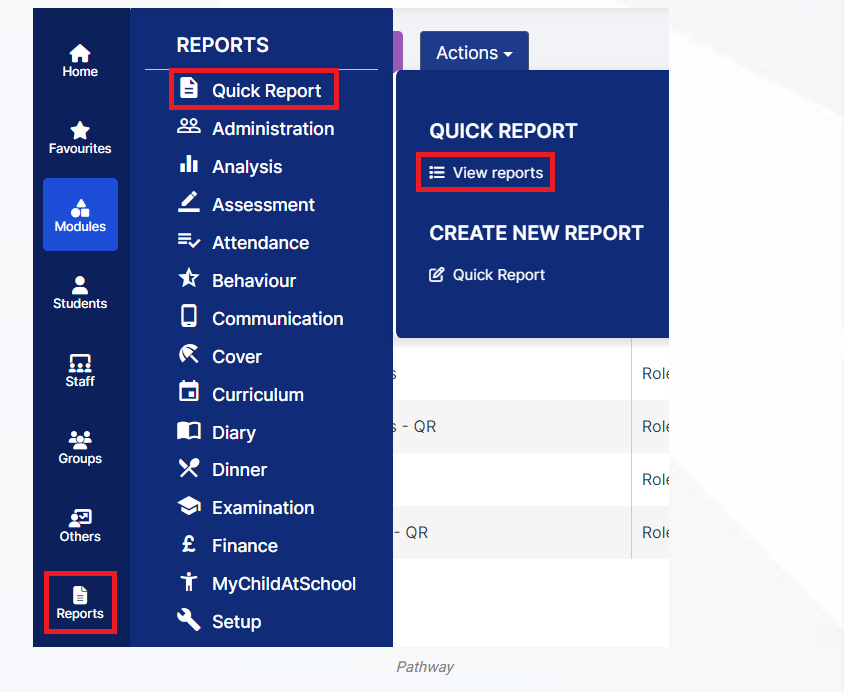
More information can be found here: How to use the Online Report Repository & Import Report Definition – Bromcom – Documentation Centre

How useful was this article?

Click on a star to rate it!

Average rating / 5. Vote count:

No votes so far! Be the first to rate this post.

Similar Posts

  • Bromcom Finance: How to Import your reconciliation file and deal with failed reconciliation items

    Once you have downloaded your file from your local authority the next step is to import the reconciliation file into Bromcom Finance. 1 ) Navigate to Modules > Finance > Homepage and select Routines > Automatic Reconciliation. Click the purple Import button top left and browse to file location of the reconciliation file 2) Select…

  • BROMCOM: Key Stage reports

    There are a number of reports that can be run for Key Stage. These can be used for analysis or to send to Parents/Guardians You can find all of these reports from Reports>Assessment>Stage Assessment Comparative Report– This report can be used to analyse Test Scores and Outcomes in Percentages to compare against National Figures Pupil…

  • Bromcom Exams: How do I import Exam Results into Bromcom

    Browse to Modules> Examination> Manage Results Click “Selections” button and click select all, or alternatively click and highlight the required students Click “Actions” button and click import results Any available results will then show that A2C have transferred to Bromcom Tick one line at a time,  and click “Import” button How useful was this article?…

  • BROMCOM: DEVON- How to upload CTF’s to Devon Transfer

    How to upload your Phonics and EYFS CTF’s to Devon Transfer. If you are a Devon school you need to upload two CTF’s to the Data and Assessment team at Devon County Council. Once you have created your CTF’s- BROMCOM: How to create a Key Stage DFE assessment CTF – Frequently Asked Questions Log into…

  • Bromcom: Unable to change staff absence end times

    Staff List Page>Choose Staff>Actions>Add Absence (and creating absence via Staff Profile page) How to Record Staff Absence – Bromcom – Documentation Centre You may find, when entering a Staff Absence, whether you select specific time (eg half day, 3/4 day) the time changes to a default time. In order to rectify this, you need to…

  • BROMCOM: Assessment – How to give access to Assessment Sheets (Marksheets) for a Head of Department/Head of School/ Teachers

    When creating your Assessment Template, (via Modules>Assessment>Manage Templates>New) as per How to Create an Assessment Sheet – Bromcom – Documentation Centre – you will have the options to associate your Teachers/HoD’s/HoY’s by using the flowchart below.  This has been designed to help you understand how to use Assessment Template Associations to generate/create Assessment Sheets. Please note, It is…