|

Bromcom Finance: How do I add a Petty Cash into the new year

If you have not run preliminary close in the old year and need money in Petty cash  “Cash In hand” you can add a temporary reimbursement as follows:

Modules> Finance> Homepage>General ledger> Petty cash processing

Click “Add Reimbursement” as show below and add your details on the right of the example screen shot.
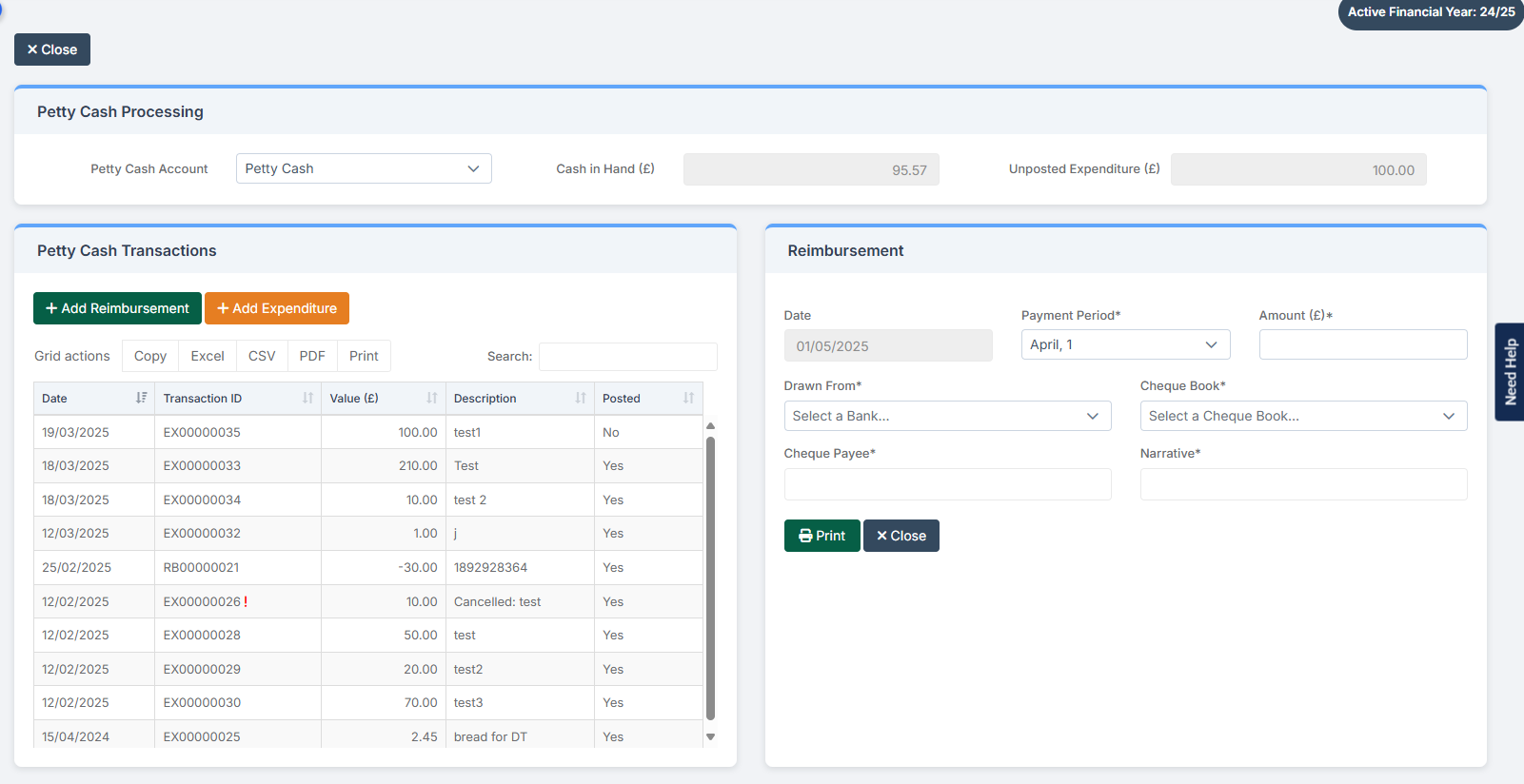
Please note: Please remember to cancel the reimbursement, once you have run preliminary close down.

How useful was this article?

Click on a star to rate it!

Average rating / 5. Vote count:

No votes so far! Be the first to rate this post.

Similar Posts

  • Bromcom: How to view Year 2’s Phonics results from when they were in Year 1

    If you need to view your current Year 2’s Phonics results from the previous year, you can do so using a report. Go to Reports on the left hand side menu, then Assessment and then Results by Pupil Use the find button to select all of your current Year 2 pupils Now select KS1 from…

  • Bromcom: MCAS menu not showing

    If your MCAS menu is not showing for certain pupils go to Config > Dinner  > Dinner Menus and open the current menu. If any Medical Conditions/Dietary Needs have been added the menu will then only show for students with those Medial Conditions/Dietary Needs. To resolve this remove the links. How useful was this article?…

  • Bromcom: Blank screen in MCAS

    Issue: A parent is logging into MCAS but is being greeted with a blank screen. Resolution: This is likely to be caused by the contact having 2 records within Bromcom. Go to Others > Contact and search for the contacts name Double click on one of the duplicated contact records and remove the student from…

  • End of Year Procedures 2025

    This FAQ lists the latest information regarding the End of Year procedures within Arbor and Bromcom. It contains all guidance notes required to carry out end of year procedures in your school. You must complete these procedures before the start of the new academic year.  Scomis is delivering Bromcom End of Year training on the…

  • Bromcom: Transferring Assessment data to Insight

    To transfer assessment data from Bromcom to Insight, you’ll typically export the data from Bromcom as a CSV file, edit it as needed, and then import it into Insight. ! We would recommend downloading one year group at a time as running by whole school may create some errors ! Steps to Transfer Assessment Data: Export…

  • BROMCOM: Key Stage reports

    There are a number of reports that can be run for Key Stage. These can be used for analysis or to send to Parents/Guardians You can find all of these reports from Reports>Assessment>Stage Assessment Comparative Report– This report can be used to analyse Test Scores and Outcomes in Percentages to compare against National Figures Pupil…