|

Bromcom: How do I add part time schedules for nursery students

To add Part Time schedules for Nursery students go to Modules > Attendance > Routines > Bulk Attendance Update.

You can then select whether you would like to update attendance for individual Students, Class/Groups or Teachers.

Then select the Student/s, Class/Group/s or Teacher/s to update by either typing the name in the box or using the Search option by clicking on the Magnifying Glass icon. The Selection List will then be displayed.

The table will update and you can select the Days or Periods to be updated by ticking or unticking the boxes.
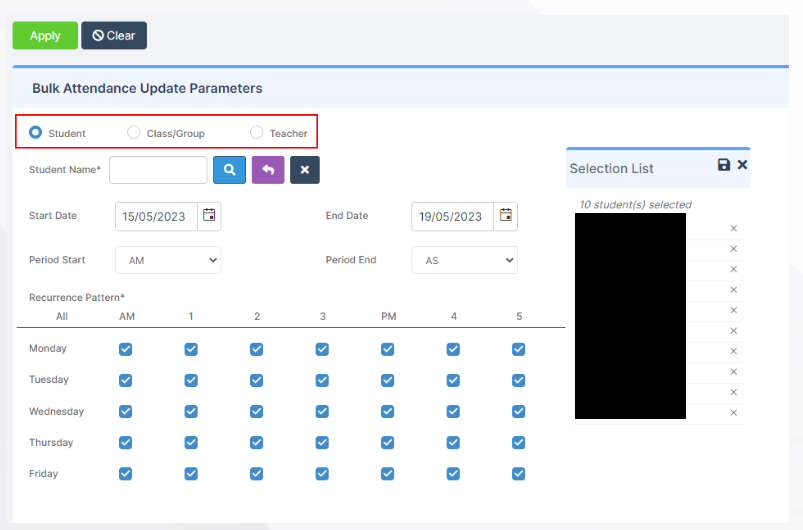


Finally tick the options required from the Override Future Attendance Mark, Override Past Attendance Mark or Overwrite Existing Comments.

Click the Apply button then Proceed on the Confirmation box.

Once completed you will get a Confirmation Comment.

How useful was this article?

Click on a star to rate it!

Average rating / 5. Vote count:

No votes so far! Be the first to rate this post.

Similar Posts

  • How to raise and vote for ideas within Bromcom

    Schools can raise and vote on Bromcom Development Ideas by accessing the Portal through the MIS. As they don’t have their own Support Portal account, they can instead request a passcode to raise an idea by clicking on Help & Resources next to their profile photo, then click Development Ideas. The passcode will be sent…

  • Bromcom: How do I partially refund a “Paid” club pupil order

    If you need to  partially refund a pupils club order, please take the following steps:   Please browse to Modules> MCAS> Online Payment> View Orders Amend the dates if required and type the pupils name into the search bar as shown in the example screen shot below and double click the order. After clicking the…

  • BROMCOM: Key Stage Year 6 CTF

    How to create a Year 6 KS2 TA CTF Once you have entered in all your marks you need to create a CTF file to send to the National Assessment Agency Please check with your LA to confirm the destination. To create a CTF in Bromcom click Students  from the left hand side menu Select…

  • Bromcom: Asking for “PIN” when deleting a student record

    You may be trying to delete a pupil and are being asked for your PIN? How do you find out what your user PIN is? Request for a PIN usually means you’re an SSO user logging in with O365 or Google, and you were prompted to set your PIN number the first time you logged…

  • BROMCOM: How to create a Key Stage DFE assessment CTF

    How to create a Key Stage DFE assessment CTF’s EYFS – Please check with your LA. If you are a Devon school-Upload to Devon Transfer Phonics – Please check with your LA. If you are a Devon school- Upload to Devon Transfer (Please note: For Devon this is a combined CTF with all Year 1’s and…