|

Bromcom: Exam Results import errors

When importing your results files into Bromcom it is possible that you may experience one of two errors.
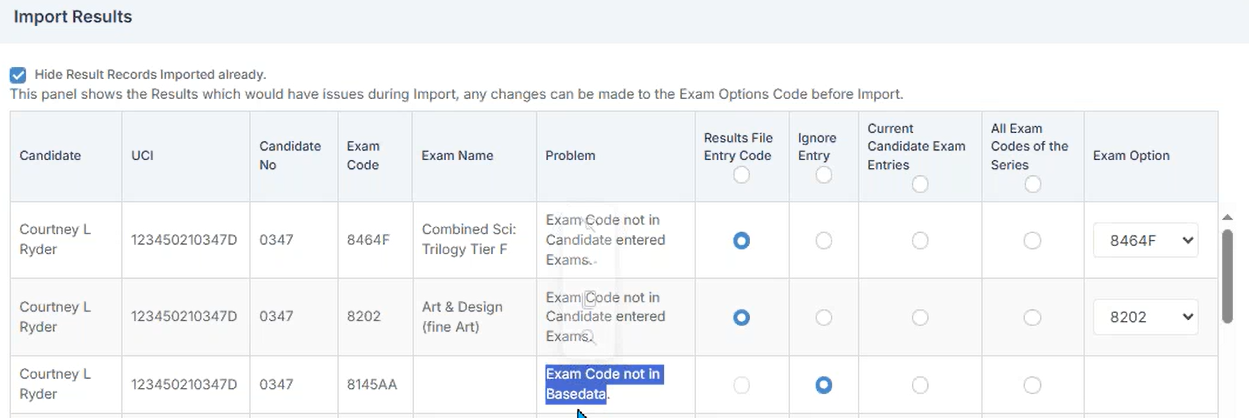
The first error as shown above is “Exam Code not in Candidate entered Exams”. This means that Bromcom cannot find an entry that corresponds with the results Exam Code. To resolve this error move the radio button into the “Results File Entry Code” column and select the relevant code from the “Exam Option” column.

The second error that can be seen above is “Exam Code not in Basedata”. This means that Bromcom cannot find any Basedata relating to the Exam Code. To resolve this you will need to import the relevant Basedata and then re-import the results file.

How useful was this article?

Click on a star to rate it!

Average rating / 5. Vote count:

No votes so far! Be the first to rate this post.

Similar Posts

  • BROMCOM: DEVON- How to upload CTF’s to Devon Transfer

    How to upload your Phonics and EYFS CTF’s to Devon Transfer. If you are a Devon school you need to upload two CTF’s to the Data and Assessment team at Devon County Council. Once you have created your CTF’s- BROMCOM: How to create a Key Stage DFE assessment CTF – Frequently Asked Questions Log into…

  • Bromcom: How do I partially refund a “Paid” club pupil order

    If you need to  partially refund a pupils club order, please take the following steps:   Please browse to Modules> MCAS> Online Payment> View Orders Amend the dates if required and type the pupils name into the search bar as shown in the example screen shot below and double click the order. After clicking the…

  • What’s new on Bromcom Finance

    You can view what is new in Finance by clicking on the megaphone icon as seen below. We will also update this FAQ with the latest changes, new features and improvements each time they are released. Sprint Release 12th December 2025     URL for further information MIS Route Information Finance – Clone Invoices and…

  • Bromcom: Exam result not importing into assessment template

    https://docs.bromcom.com/knowledge-base/how-to-include-exam-results-in-assessments-sheets/ As outlined in the referenced article, you may find that after completing the routine, the expected results do not appear. If this occurs, please verify that your internal subject names are correctly mapped to the exam name. This can be done by navigating to: Config > Analysis > Exam Options Subjects For detailed guidance,…

  • Bromcom: Updating Staff Current Job Title

    To update the staff current job title in bulk go to Staff > Selection > Select All and then Actions > Manual Data Export. From here select “Basic Details” and tick “Include empty records where data does not exist” and click Export Open the spreadsheet that has been downloaded and enter all required information. After…