Bromcom: Exam result not importing into assessment template

https://docs.bromcom.com/knowledge-base/how-to-include-exam-results-in-assessments-sheets/

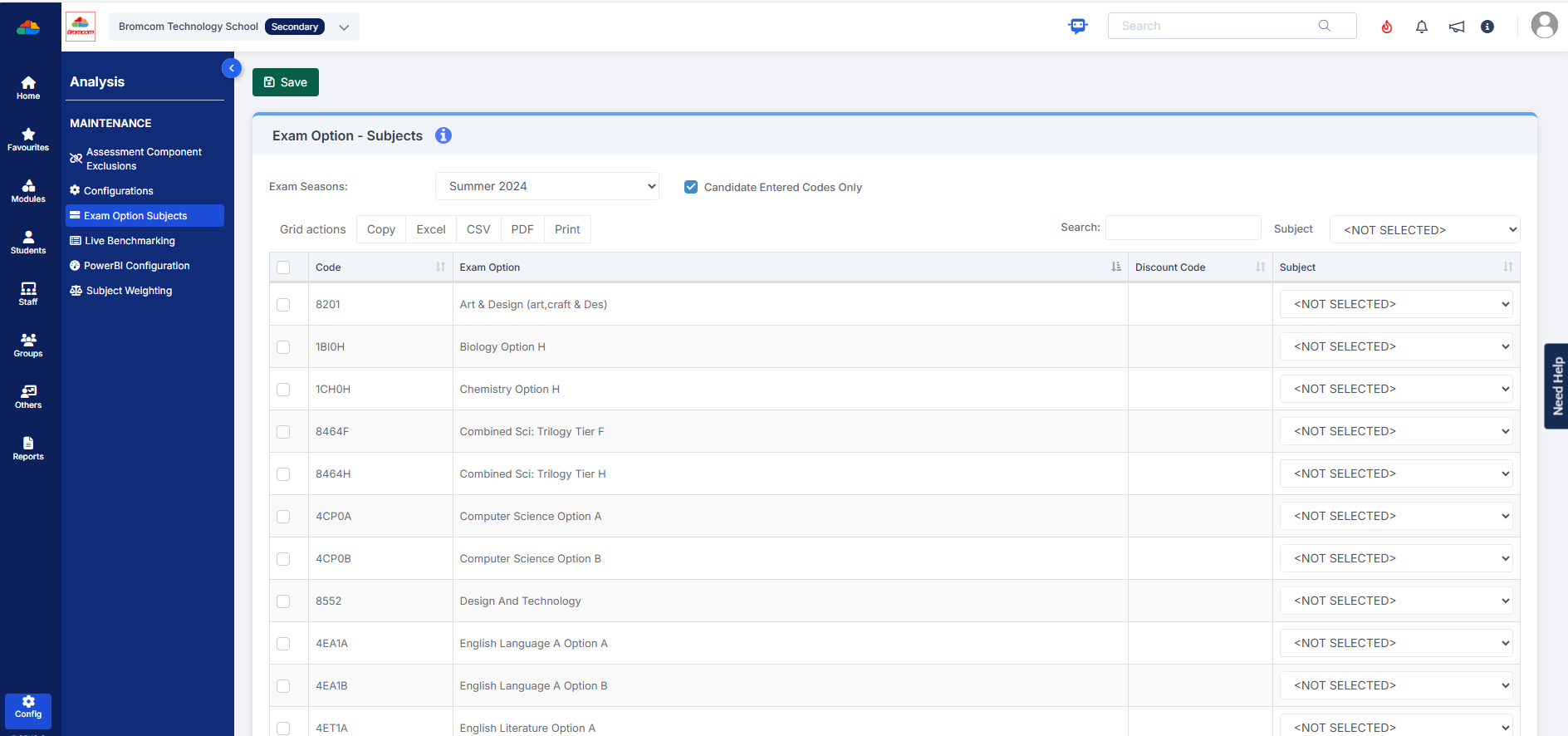
As outlined in the referenced article, you may find that after completing the routine, the expected results do not appear. If this occurs, please verify that your internal subject names are correctly mapped to the exam name. This can be done by navigating to:

Config > Analysis > Exam Options Subjects

For detailed guidance, please refer to the documentation:

How to use Exam Option Subjects – Bromcom – Documentation Centre)
How useful was this article?

Click on a star to rate it!

Average rating / 5. Vote count:

No votes so far! Be the first to rate this post.

Similar Posts

  • BROMCOM: How to View Marksheets as a Teacher or Admin

    How to view the Marksheets for Key Stage Assessments in Bromcom, once the configurations has been complete: BROMCOM: How to add ‘Configurations’ to a Role for Key Stage – Frequently Asked Questions There are a few ways the Marksheets can be viewed in Bromcom for a Teacher: From the Homepage, go to Settings on the…

  • Bromcom: How to see who has received MCAS push notifications

    To see who has received push notifications you can use Modules > Communication > Overview to see who push notifications have been sent to:         You can use Modules > MyChildAtSchool > Overview to review app installations:     Additionally there is an MCAS domain in Quick Reports for the school to…

  • Bromcom: Managing Spine Points for Staff

    Full details on how to manage spine points in Bromcom can be found below, however please note, even though the spinal progression month is recorded in the contract you will still need to go to Modules > Administration > Spinal Progression for Staff and set the effective date for the increment so this is automatically…

  • Bromcom: Why can’t I see all of the exam seasons?

    This maybe due to your data boundary. Check under your account profile by going to your photo in the top right-hand corner of the MIS, My Account > Current Interval.   Data Boundaries are used to define what Staff can view in relation to current and historic Student Data, for example External Staff may only require the Current Years Data.   From the…

  • BROMCOM:Shared Staff in a tutor group

    If you have more than one staff member with scheduled timetabled registers e.g Mr Smith is timetabled for Mon-Wed and Mrs Brown is scheduled Thur- Fri then you might want to remove tick box ten from the Daily Maintenance Settings. The Daily Maintenance Settings are a group of processes that are performed automatically on a…