Bromcom: Admin – Login as Another Staff Member (often referred to “Green” eye or “View as Other” )
A great feature within Bromcom, when setting up Roles and Permission, is the ability to view another staff members login, which can be crucial and time saving when setting up and maintaining the system correctly.
Users with appropriate permissions (in Config > Setup > Roles and Permissions under the Framework Module in Staff) can login as another user.
Open a Staff Profile (using the Staff List page and double clicking to select a user)
Within the top right-hand corner, next the user details, you will see a green eye (as below)
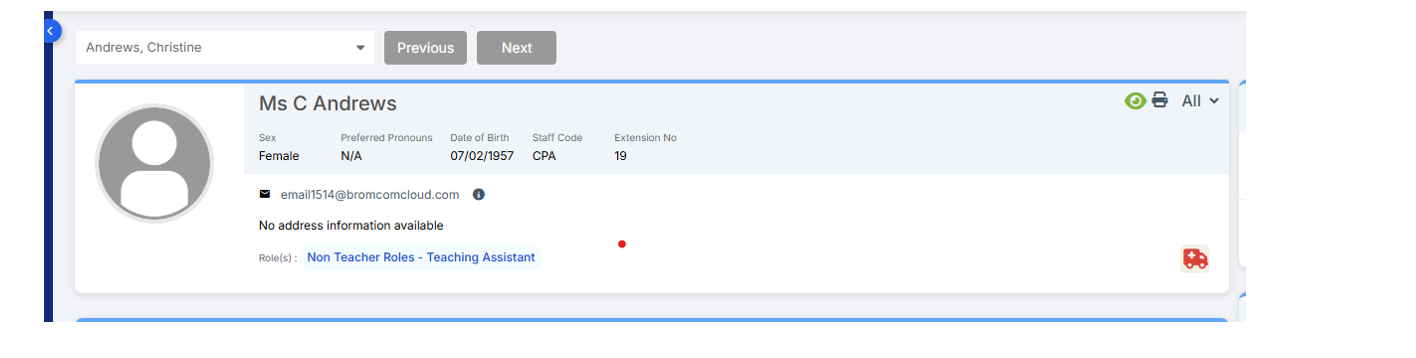 Click on the green eye and click Copy
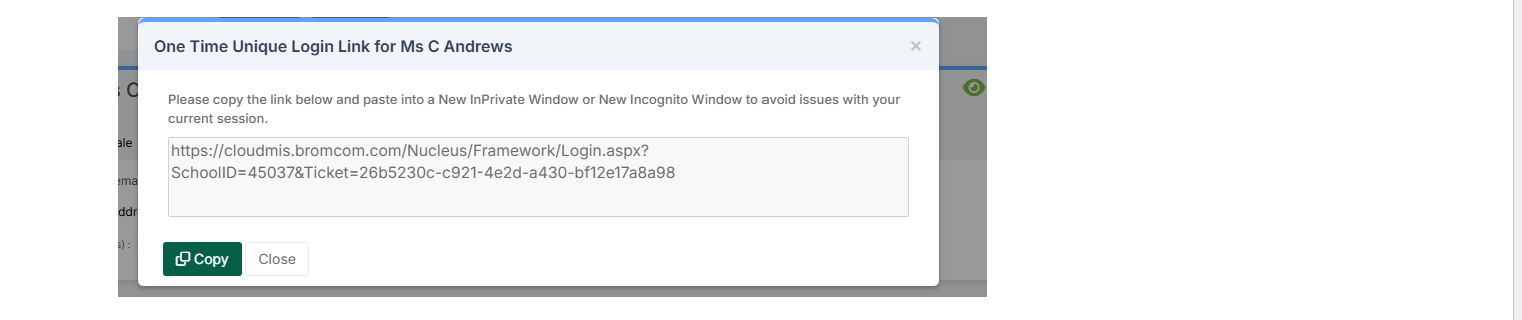
Then open a fresh new internet tab and paste the URL into the address bar and hit return.
You will then see what the user will see when they log in.
If the green eye is greyed out or not displayed, or you hover over the green eye and get a message “MIS login credentials not available for this staff “ it may be that you have not linked the accounts correctly. If this is the case you will need to remove the current user account and remake this, ensuring that you are creating the account and linking it to a current staff record and not creating a new one.
You can find out more information here: https://docs.bromcom.com/knowledge-base/creating-user-accounts/”
Side Notes:
You may need to use Incognito/InPrivate browser mode (Ctrl-Shift-N) Using Incognito/InPrivate means you only see that user’s view of Bromcom.
If you have set up a permission/role and the user still cannot access what they need, the user may have multiple roles. Ask them to click on their photo top-right, then Change Role then Clear view filter. This will merge all the permissions from the different roles to give access to everything that the different roles have.
Should you have any further issues, please contact the Scomis Service Desk.