| |

Bromcom Finance & Budgeting : How do I enter a Variance reason in Budget Variances

Modules> Finance> Homepage> Budgeting> Budget Variances

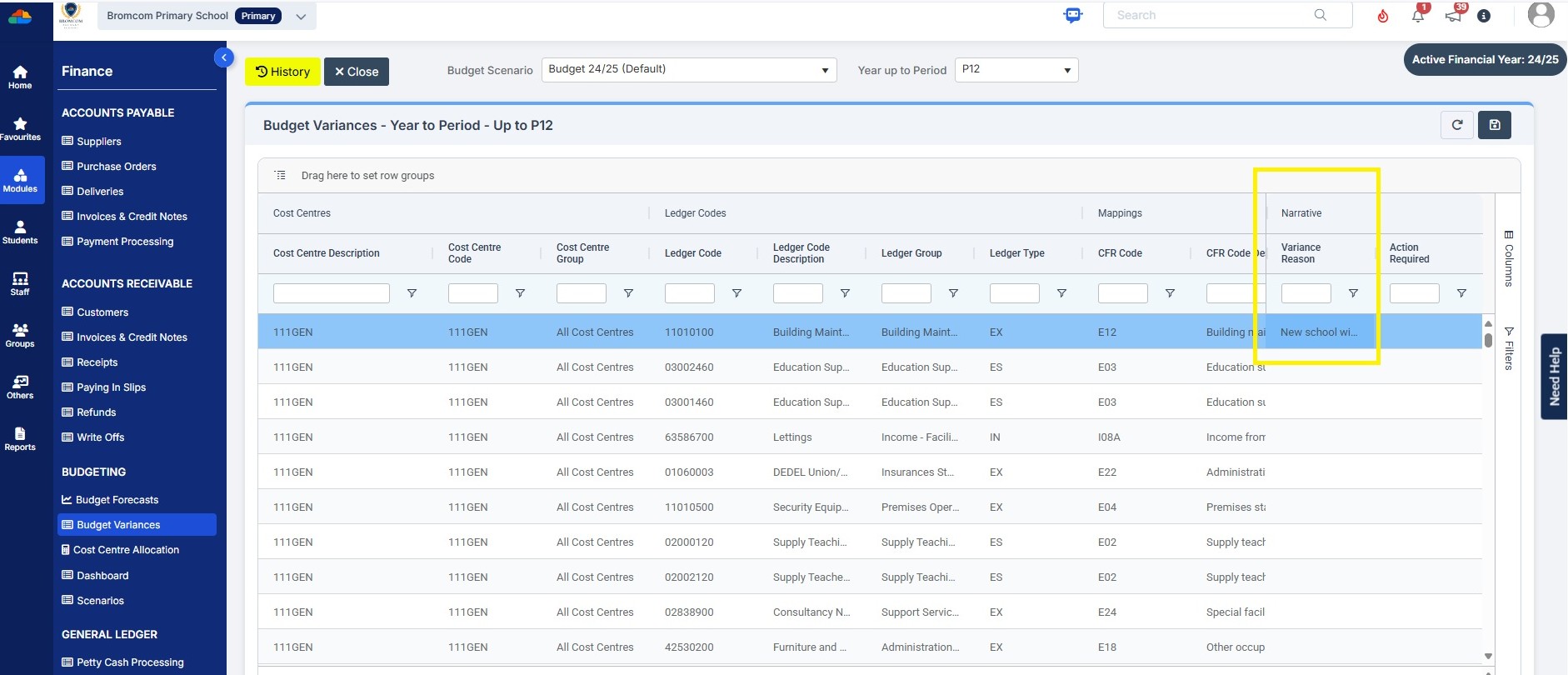
In the budget variances you can add a budget variance reason against e.g a Cost centre as shown in this example below:

Note: Any Variance reason needs to be added before you sort your columns – see sorting columns FAQ – Bromcom Finance & Budgets: How do I sort columns in my Budget Variance – Frequently Asked Questions

Click into the cell as shown in the screen shot below to add your variance reason
How useful was this article?

Click on a star to rate it!

Average rating / 5. Vote count:

No votes so far! Be the first to rate this post.

Similar Posts

  • BROMCOM: Assessment – How to give access to Assessment Sheets (Marksheets) for a Head of Department/Head of School/ Teachers

    When creating your Assessment Template, (via Modules>Assessment>Manage Templates>New) as per How to Create an Assessment Sheet – Bromcom – Documentation Centre – you will have the options to associate your Teachers/HoD’s/HoY’s by using the flowchart below.  This has been designed to help you understand how to use Assessment Template Associations to generate/create Assessment Sheets. Please note, It is…

  • Bromcom – Readmit student

    To begin, go to the Student List page. From there, press Search Filters on the top right and change the Status to Leaver. Now select the student/s that you wish to Re-admit and press Actions>Re-admit Student(s). If you are Re-admitting multiple students, the Re-admit Date you select is going to apply to each student so please double check the dates you need before proceeding. Further and full information can be found here: How to…

  • Bromcom: Attendance – What is the “Projector Mode” when taking a register?

    Projector mode, which when turned on, will hide potentially sensitive information on registers from being shown on the Teacher’s screen.  This could be sensitive information such as a students SEN, PP or FSM.   In the example below the Projector Mode is Off.  In the example below the Projector Mode is On.  To reenable the Projector…

  • BROMCOM:Shared Staff in a tutor group

    If you have more than one staff member with scheduled timetabled registers e.g Mr Smith is timetabled for Mon-Wed and Mrs Brown is scheduled Thur- Fri then you might want to remove tick box ten from the Daily Maintenance Settings. The Daily Maintenance Settings are a group of processes that are performed automatically on a…

  • Configuring Clubs, Trips, and Wraparound Care in MyChildAtSchool

    It’s possible to display details on Clubs, Trips, and Wraparound Care in MyChildAtSchool. In giving parents/guardians access to these areas you’re enabling them to book, and pay for their children to attend these activities. The following KB will details the configuration settings available for these areas. Navigating to the Clubs/Trips Settings Page The Clubs/Trips Settings…