BROMCOM: Assessment – How to give access to Assessment Sheets (Marksheets) for a Head of Department/Head of School/ Teachers

When creating your Assessment Template, (via Modules>Assessment>Manage Templates>New) as per How to Create an Assessment Sheet – Bromcom – Documentation Centre – you will have the options to associate your Teachers/HoD’s/HoY’s by using the flowchart below.  This has been designed to help you understand how to use Assessment Template Associations to generate/create Assessment Sheets.

Please note, It is expected Bromcom functionality that, using the Head of Department as an example, they will not see all of the sheets directly on their Homepage > Assessment.  The HoD will need to access all of the sheets associated to them by going to Modules > Assessment > Assessment Sheet List and ensure that “Head of Department” is selected under User Access.  Selecting “Head of Department” under User Access will enable them to view all relevant marksheets.

The flowchart details various scenarios of which Marksheets a Head of Department, Head of School or Teachers can view, eg view teaching group’s sheets, an overview of the whole year, dynamic groups etc.

ROJ8NziQ-Assessment-Template-Associations-1

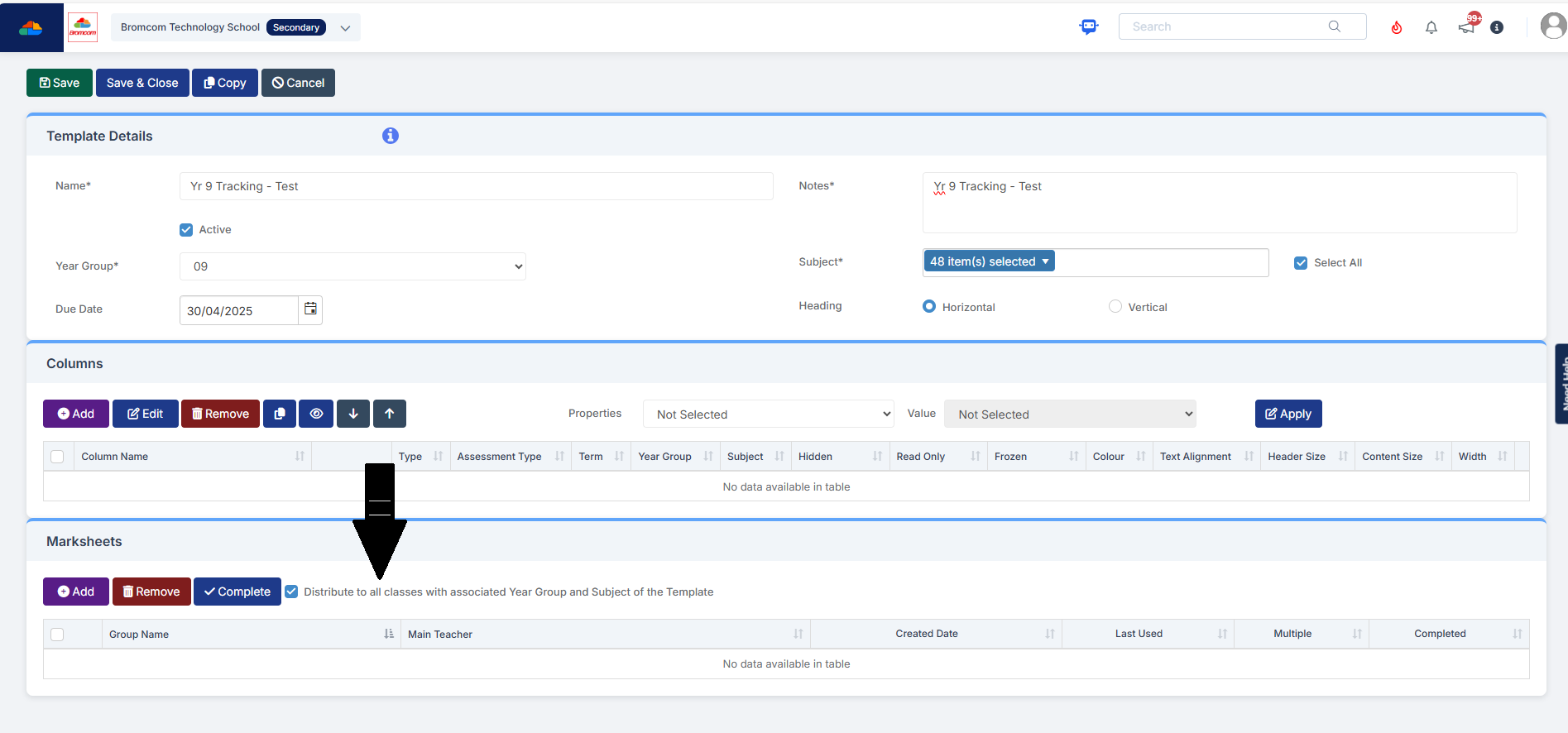
A further example, if you wanted to distribute your marksheets to all classes with the associated year group and subject of the Template, you would tick this box within the Marksheets selection when creating your Template.


How useful was this article?

Click on a star to rate it!

Average rating / 5. Vote count:

No votes so far! Be the first to rate this post.

Similar Posts

  • School Workforce Census Bulletin 2025

    This FAQ lists the latest information regarding the School Workforce Census. It contains links to relevant documentation for Arbor and Bromcom. School Workforce Census Date: Thursday 6th November 2025 School Workforce Census Deadline Date to DfE: Friday 21st November 2025 (If you are a maintained school please consult your LA) Latest Census Information KNOWN ISSUES…

  • Windows 7 Device and Printer window is blank

    When looking in the Devices and Printers section of the Control Panel (or from the Start Menu) the page takes a long time to load and shows 0 items.

  • Bromcom: Parent only seeing one child in MCAS

    You may find that you receive queries from Parents as to why they can only see one of their children in MCAS.  This may be because “Grant access to student details on MCAS” is not ticked” within the contact record. Please go to “Others”, Type: “Contact” and open the contact record.  Within “Linked Students”, double…

  • Bromcom: Exams Embargo – Formula Visibility in Assessment Sheets

    The Exams Embargo only applies to the Exams Module. However, if formulas are used in Assessment Sheets to reference embargoed results, they can become visible to staff with certain Assessment permissions. To maintain the security of results and uphold the embargo, Bromcom have introduced a toggle setting to disable formulas from exposing embargoed exam results…