|

Bromcom Finance: Previous year’s central payments and receipts are showing within the current financial year

This is expected functionality in Bromcom Finance.

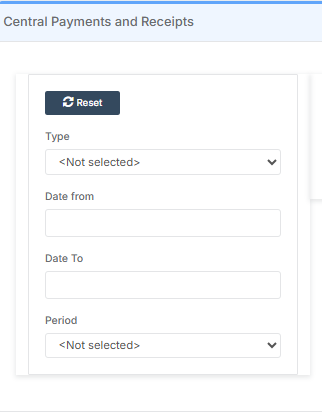
The Central Payments and Receipts page has no Financial Year filter on it so it will always show every single central payment and receipt entered.

There is a date range filter on the page on the left hand side which can be used to only see central payments and receipts entered during a specific date range.
How useful was this article?

Click on a star to rate it!

Average rating / 5. Vote count:

No votes so far! Be the first to rate this post.

Similar Posts

  • Bromcom: How to enter marks into Key Stage DFE assessment marksheet

    Once you have opened your marksheet- BROMCOM: How to View Marksheets as a Teacher or Admin – Frequently Asked Questions you will need to enter your marks There are three ways to enter marks into Bromcom  You can enter marks by  clicking in each cell and entering the marks 1 by 1 Alternatively if you…

  • Creating a Wraparound Care club to collect Nursery Payments

    All 3 to 4-year-olds in England can get 570 free hours per year. It’s usually taken as 15 hours a week for 38 weeks of the year. You can choose to take fewer hours over more weeks, if your childcare provider offers this option. Some parents wish their child to have extra hours and will…

  • BROMCOM – Quick Summary Guide – Pre-checks and Generating School Census

    This FAQ is a quick check list for updating information before Census.  For Schools wanting the latest documentation for Census and using Bromcom – Click here  to jump to the relevant section. Thursday 21st of May 2026 is census day Wednesday 17th of June 2026 is your census submission deadline (unless otherwise advised by your Local…

  • BROMCOM: Assessment – How to give access to Assessment Sheets (Marksheets) for a Head of Department/Head of School/ Teachers

    When creating your Assessment Template, (via Modules>Assessment>Manage Templates>New) as per How to Create an Assessment Sheet – Bromcom – Documentation Centre – you will have the options to associate your Teachers/HoD’s/HoY’s by using the flowchart below.  This has been designed to help you understand how to use Assessment Template Associations to generate/create Assessment Sheets. Please note, It is…

  • Bromcom Finance: How do I setup a Free Text (Sundry) invoice

    Sundry Invoices should be raised for ad hoc and/or infrequent payments e.g. for payments to staff. You cannot raise a purchase order or free text order against sundry suppliers. Sundry suppliers and invoices can be setup as below: Browse to Modules> Finance> Homepage>Supplier and complete the supplier setup if not already done Tick “Sundry Supplier”…