|

Bromcom: How to show just statutory columns in a Key Stage Assessment marksheet

If you want your Key Stage marksheet to show only the statutory marks, you can filter this in some marksheets.

Go to Modules>Assessment>Assessment Sheets List
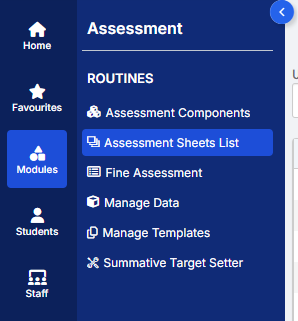
Browse to your chosen Key Stage marksheet, in this example we’ve chosen the Year 1 Phonics marksheet KS1-2025-01

In the top right of this marksheet click on the cog icon
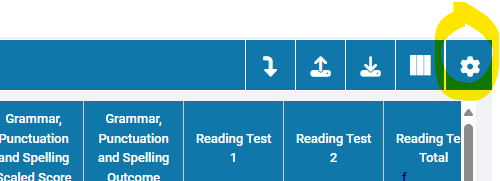
This opens the settings that allow you to select Statutory Marks only, tick this box and click Confirm.
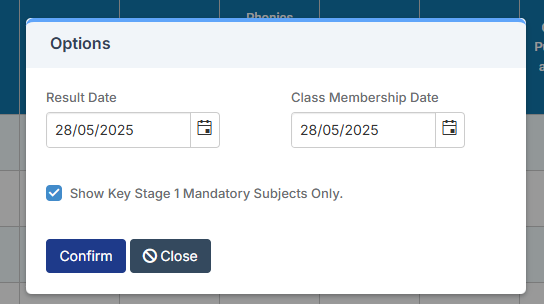
The marksheet should now only show the Statutory Marks.

Please note this option is not available for the Year 4 Multiplication Check marksheet.


How useful was this article?

Click on a star to rate it!

Average rating / 5. Vote count:

No votes so far! Be the first to rate this post.

Similar Posts

  • Bromcom: MCAS User Activity

    You may be starting to roll out MCAS and have been sending links out to parents. In Bromcom, you can run a report that shows you which students parents have not activated their account. You can run the User Accounts Report under Reports>MCAS>Account Report.  Here you will be able to run a report of all…

  • Bromcom Finance: How do I add a pay award ?

    Please note: This method is recommended for confirmed pay awards, if adding a projected pay award, please follow step 5  Browse to Config>Administration>Base Pay Structures>double click the required Base Pay structure, e.g JK – Job Evaluation Hours Per Annum, JE – Job Evaluation All Year Round,  JL – Job Evaluation > HPA 5 yrs, Teachers…

  • Bromcom – Data Boundary Information

    Data Boundaries are useful during End of Year – but can sometimes cause confusion. A Data Boundary is created in Config > Setup > Data Boundaries. You set a start and end date for the boundary as well as the roles this is available for. The user can select which data boundary they are in…

  • Bromcom: How to view Year 2’s Phonics results from when they were in Year 1

    If you need to view your current Year 2’s Phonics results from the previous year, you can do so using a report. Go to Reports on the left hand side menu, then Assessment and then Results by Pupil Use the find button to select all of your current Year 2 pupils Now select KS1 from…