Bromcom: How to enter marks into Key Stage DFE assessment marksheet

Once you have opened your marksheet- BROMCOM: How to View Marksheets as a Teacher or Admin – Frequently Asked Questions you will need to enter your marks

There are three ways to enter marks into Bromcom 

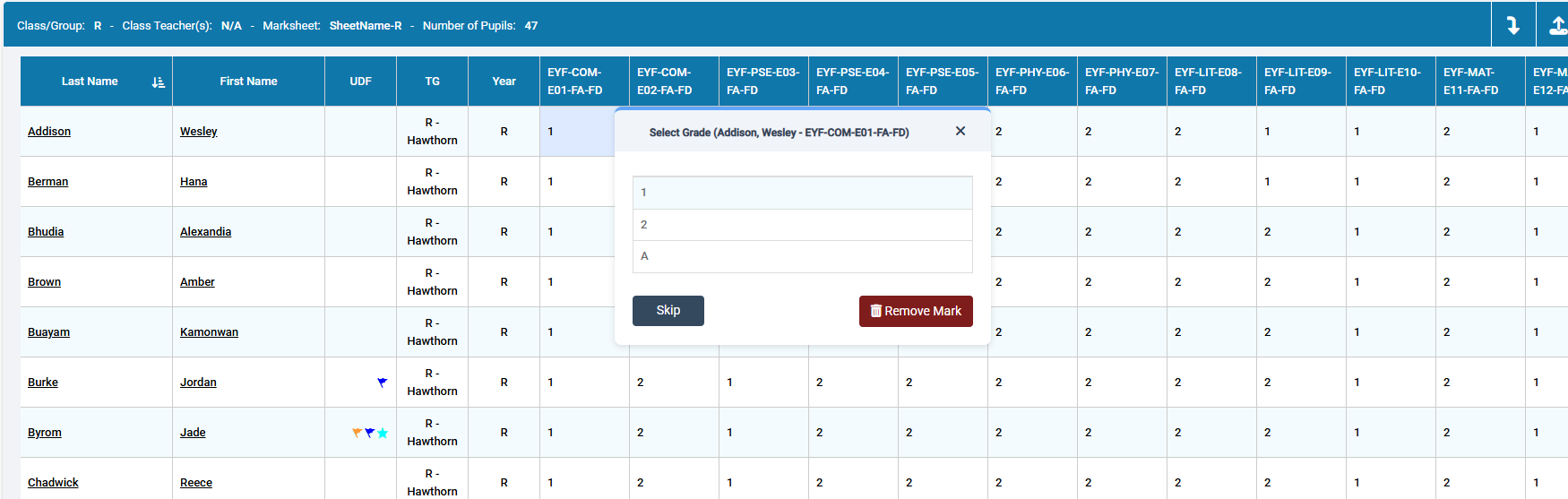
You can enter marks by  clicking in each cell and entering the marks 1 by 1
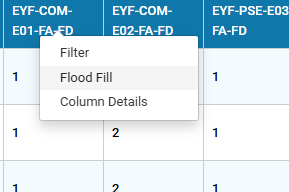
Alternatively if you have a number of pupils with the same mark you can right click on the column heading and “Flood fill”
Lastly you can export the marksheet to Excel

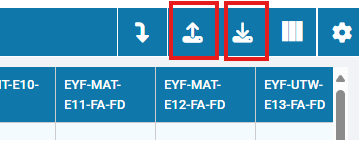
Click on the first button shown below to download the Excel marksheet.
Open the marksheet from your Downloads folder

Fill in the marks in Excel

Save the Excel document

Go back into Bromcom and click the second button shown above and locate your saved Excel file and Import.


Once you have entered in all your marks you should be ready to send your CTF’s – BROMCOM: How to create a Key Stage DFE assessment CTF – Frequently Asked Questions

How useful was this article?

Click on a star to rate it!

Average rating / 5. Vote count:

No votes so far! Be the first to rate this post.

Similar Posts

  • BROMCOM: How to create a Key Stage DFE assessment CTF

    How to create a Key Stage DFE assessment CTF’s EYFS – Please check with your LA. If you are a Devon school-Upload to Devon Transfer Phonics – Please check with your LA. If you are a Devon school- Upload to Devon Transfer (Please note: For Devon this is a combined CTF with all Year 1’s and…

  • BROMCOM: How to import Year 6 CTF SATS

    Once your Year 6’s have completed their SATS you will revive a CTF file with the results that you can import into your Bromcom Go to Students from the left hand side menu From the Year group filter select Year 6 From the Selections button click ‘Select All‘. This should then highlight all your required…

  • BROMCOM: Devon County Council- Key Stage Upload dates

    The following dates have been provided by the Devon Data and Assessment Team. For further information please contact below Tel: 01392 287317 Email: Schooldataassessment@devon.gov.uk Your Key Stage CTF’s must be uploaded via Devon Transfer by the following dates. EYFS Deadline – 30th June 2025 Phonics- 23rd June 2025 (Please include Year 1 and Year 2…

  • Bromcom: How do I create a CTF that includes leavers?

    If you need to create a CTF that includes both current pupils and those that are leavers for Key Stage DFE Assessments, you can do this using the search filters option from within the student area. EYFS – Please check with your LA. If you are a Devon school-Upload to Devon Transfer Phonics – Please…

  • Bromcom: How to create a Phonics CTF for Year 1 and Year 2

    Please check with your LA for CTF requirements. If you are a Devon school- Upload to Devon Transfer (Please note: For Devon this is a combined CTF with all Year 1’s and Year 2 retake pupils in ONE CTF. ONLY INCLUDE YEAR 2’S WHO HAVE RETAKEN PHONICS THIS YEAR) To create a CTF that includes…

  • BROMCOM: KS2 Key Stage Return

    This FAQ is for the users in school who need to carry out the  KS2 TA Key Stage return For more information please see the following DFE guide- Key stage 2 teacher assessment guidance 2025 – GOV.UK To view further guides please see the following Scomis Bulletin- Key Stage Bulletin 2025 – Frequently Asked Questions…