|

Bromcom Finance: Error posting Individual salary payment

When posting the Individual salary payment an error is generated as below :
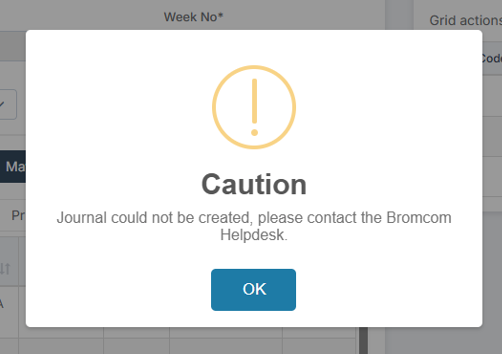
This is most likely due to the “Base Pay” associated with the ledger codes being used, having missing information e.g Missing Financial subgroup.

  1. Please browse to: Modules> Finance> Homepage>Staffing> Base Pay Mapping, locate the Base pay being used for the individual salary payment and add the missing information e.g  the “Financial Subgroup”
  2. Navigate back to individual salary  payment screen  – Modules> Finance> Homepage>Individual Salary payment and click “Save & Post” the Journal.

Base Pay Mapping

Please click the following link for more information on Base Pay Mapping Instructions

Individual Salary Payments

Please click the following link for more information on creating an Individual Salary Payment Instructions


How useful was this article?

Click on a star to rate it!

Average rating / 5. Vote count:

No votes so far! Be the first to rate this post.

Similar Posts

  • Finding your iPad’s MAC Address

    If your the wireless network you are connecting to is a Managed Network, then you will need to provide your Network Administrator with the iPad’s MAC Address. To obtain this first Tap on the Settings Icon… Once in the settings application, you will be in the General Screen as shown below: Tapping on About will…

  • BROMCOM: Which Marksheet to Enter Phonics Results

    In Bromcom via Modules > Assessment > Assessment Sheet List, the Phonics is Entered in the Marksheet named KS1-2025-01 for Year 1 Pupils. For Year 2 Phonics Retakes – This is entered in KS1-2025-02  The marks are entered in the Phonics Screening Check Mark This takes you through how to Enter in Marks How useful…

  • BROMCOM: DEVON- How to upload CTF’s to Devon Transfer

    How to upload your Phonics and EYFS CTF’s to Devon Transfer. If you are a Devon school you need to upload two CTF’s to the Data and Assessment team at Devon County Council. Once you have created your CTF’s- BROMCOM: How to create a Key Stage DFE assessment CTF – Frequently Asked Questions Log into…

  • BROMCOM: Devon County Council- Key Stage Upload dates

    The following dates have been provided by the Devon Data and Assessment Team. For further information please contact below Tel: 01392 287317 Email: Schooldataassessment@devon.gov.uk Your Key Stage CTF’s must be uploaded via Devon Transfer by the following dates. EYFS Deadline – 30th June 2025 Phonics- 23rd June 2025 (Please include Year 1 and Year 2…

  • How to raise and vote for ideas within Bromcom

    Schools can raise and vote on Bromcom Development Ideas by accessing the Portal through the MIS. As they don’t have their own Support Portal account, they can instead request a passcode to raise an idea by clicking on Help & Resources next to their profile photo, then click Development Ideas. The passcode will be sent…

  • Adding Pupil Premium to your MIS

    Arbor ‘Pupil Premium Eligible’ in Arbor is an indicator of whether a student may be eligible for Pupil Premium based on their background, such as being in receipt of Free School Meals. The Pupil Premium tag may not be a true representation of who actually receives Pupil Premium funding in the school (shown by the…