|

Bromcom Finance: How can I print my imported “Automatic Reconciliation file”

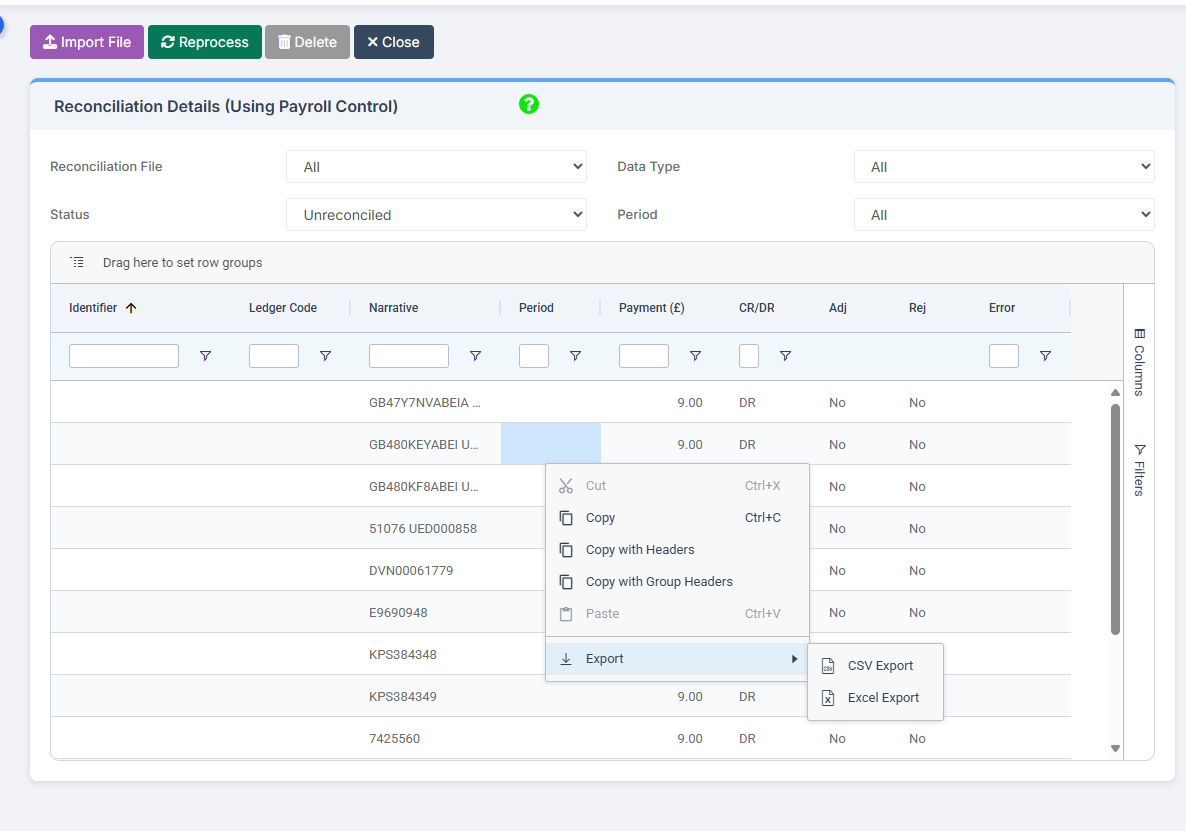
Once in Modules > Finance> Homepage>Routines> Automatic reconciliation, please right click in the listing and then click export as shown in the screen shot  below.  This will then allow you to export to excel or csv and print as required.
 

How useful was this article?

Click on a star to rate it!

Average rating / 5. Vote count:

No votes so far! Be the first to rate this post.

Similar Posts

  • Key Stage Bulletin 2025

    This FAQ contains the latest information and guides regarding the Key Stage Return 2025.  Please see below for further guidance DFE information can be found here- School curriculum – GOV.UK KS1 is still Optional. Please see the following article from the DFE –  Changes to KS1 Important Dates Phonics Threshold mark release date- 23rd June…

  • Bromcom Finance & Budgeting : How do I enter a Variance reason in Budget Variances

    Modules> Finance> Homepage> Budgeting> Budget Variances In the budget variances you can add a budget variance reason against e.g a Cost centre as shown in this example below: Note: Any Variance reason needs to be added before you sort your columns – see sorting columns FAQ – Bromcom Finance & Budgets: How do I sort…

  • Configuring Data Collection Sheets in MyChildAtSchool

    MyChildAtSchool (MCAS) can be used to give parents/guardians access to data collection sheets. In this KB we’ll show you how to configure data collection sheets both for current students, and preadmissions. Navigating To The Settings You can configure data collection sheets under Config>MyChildAtSchool>Students And Contact Details Settings Form Permissions In the Students And Contact Details…

  • BROMCOM: DEVON- How to upload CTF’s to Devon Transfer

    How to upload your Phonics and EYFS CTF’s to Devon Transfer. If you are a Devon school you need to upload two CTF’s to the Data and Assessment team at Devon County Council. Once you have created your CTF’s- BROMCOM: How to create a Key Stage DFE assessment CTF – Frequently Asked Questions Log into…

  • DCC Applications error 117

    117- file opening error- 152 system error- 104- database connection error …………..

  • Bromcom: How to show just statutory columns in a Key Stage Assessment marksheet

    If you want your Key Stage marksheet to show only the statutory marks, you can filter this in some marksheets. Go to Modules>Assessment>Assessment Sheets List Browse to your chosen Key Stage marksheet, in this example we’ve chosen the Year 1 Phonics marksheet KS1-2025-01 In the top right of this marksheet click on the cog icon…