|

Bromcom Finance: How do I add an additional allowance?

If you need to add an additional allowance for a staff member, you will first need to add a new version date for the allowance as follows:

  1. Browse to Config>Administration> Additional allowances
  2. Click the allowance line E.G  if you want to update TL3 – Teaching and learning responsibilities
  3. Under the “Versions” click add new date e.g starting from 1/4/2025 add the allowance award e.g £1500 as shown the screen shot below.
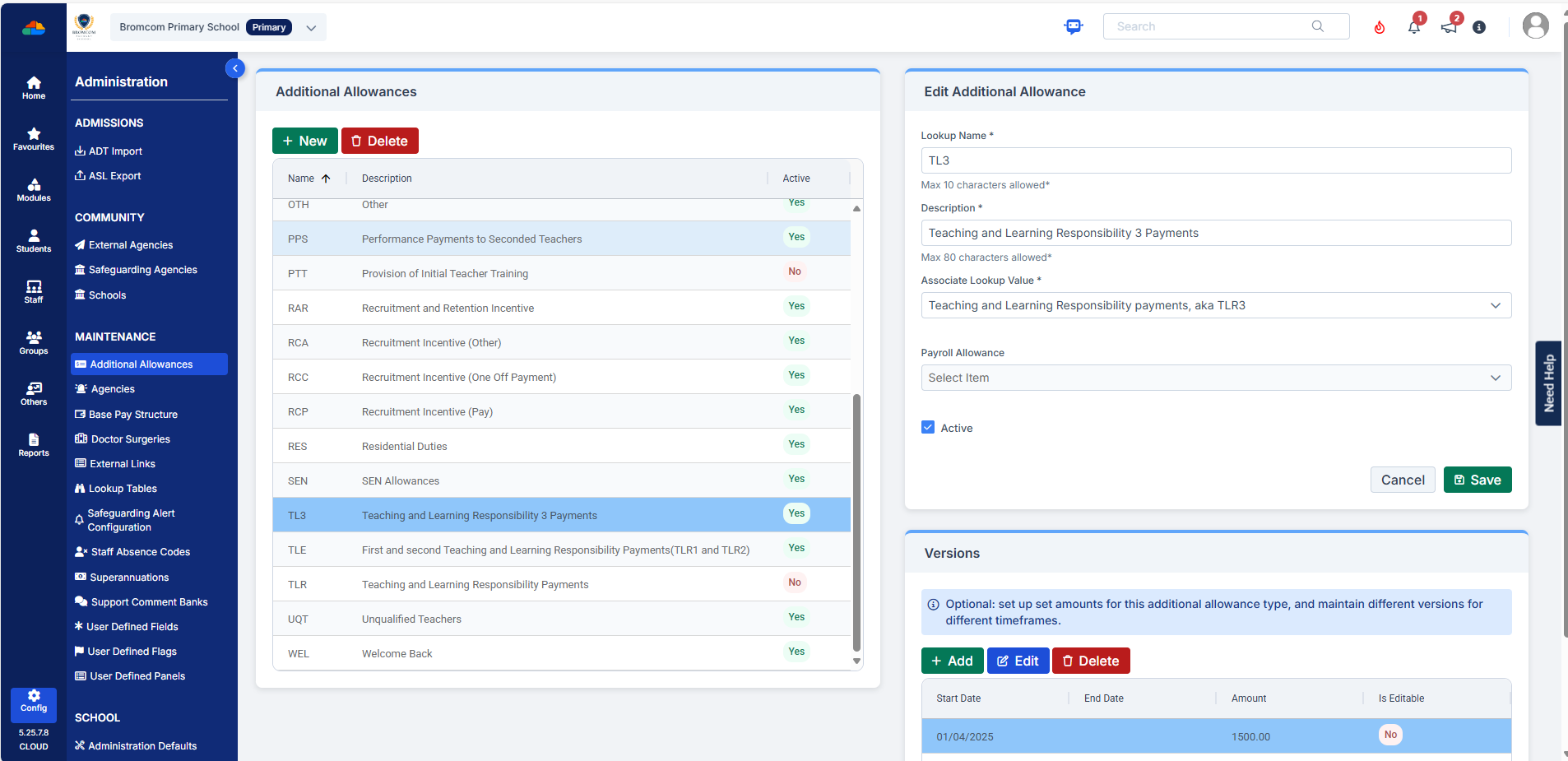
Example: Allowance selected

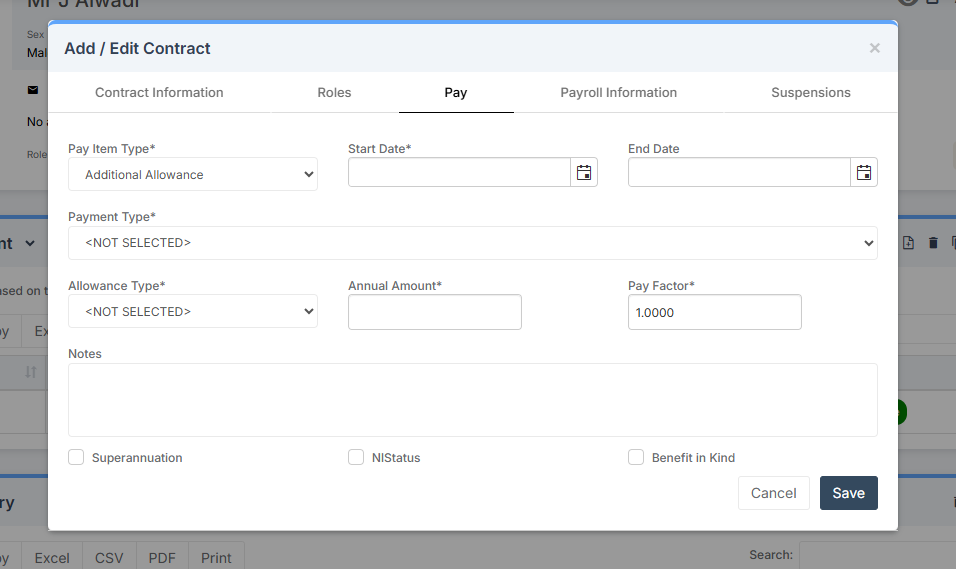
Once you have added the allowance, you will need to update the staff members contract, under the “Pay tab” within the contract with the allowance.

Example:Adding the allowance into the staff members contract under the pay tab.
For further information, please also see Administration – Staff: Additional Payments/Allowances – Bromcom

How useful was this article?

Click on a star to rate it!

Average rating / 5. Vote count:

No votes so far! Be the first to rate this post.

Similar Posts

  • Bromcom Finance: I have clicked print and not print and export

    When processing your payments file in central processing for county, you need to click “Print & Export” only. This is because it produces two files a text file and PDF file.  You will need the text file to process through DTSAPPS. If you have clicked print, this will produce a PDF file in central authorisation…

  • Bromcom Finance and DTSApps: How to process your invoice file PLYMOUTH SCHOOLS

    Once you have clicked “Print and Export” in Central Authorisation in Bromcom, you will need to process your TXT file through DTSApps Click here to log into DTSApps 2) If you work in more than one school, please ensure you select the DTSApps for the school you are processing the file for. 3) In the…

  • Creating a Wraparound Care club to collect Nursery Payments

    All 3 to 4-year-olds in England can get 570 free hours per year. It’s usually taken as 15 hours a week for 38 weeks of the year. You can choose to take fewer hours over more weeks, if your childcare provider offers this option. Some parents wish their child to have extra hours and will…

  • Bromcom Finance: How to add Base Pay Mapping?

    Please see the following guide on how to map your base pay: Modules> Finance> Homepage> Staff> Base Pay mapping Base Pay Mapping How useful was this article? Click on a star to rate it! Submit Rating Average rating / 5. Vote count: No votes so far! Be the first to rate this post.

  • Bromcom: Updating Staff Current Job Title

    To update the staff current job title in bulk go to Staff > Selection > Select All and then Actions > Manual Data Export. From here select “Basic Details” and tick “Include empty records where data does not exist” and click Export Open the spreadsheet that has been downloaded and enter all required information. After…

  • Bromcom: How to view Year 2’s Phonics results from when they were in Year 1

    If you need to view your current Year 2’s Phonics results from the previous year, you can do so using a report. Go to Reports on the left hand side menu, then Assessment and then Results by Pupil Use the find button to select all of your current Year 2 pupils Now select KS1 from…