|

Bromcom: Blank screen in MCAS

Issue: A parent is logging into MCAS but is being greeted with a blank screen.

Resolution: This is likely to be caused by the contact having 2 records within Bromcom.

Go to Others > Contact and search for the contacts name
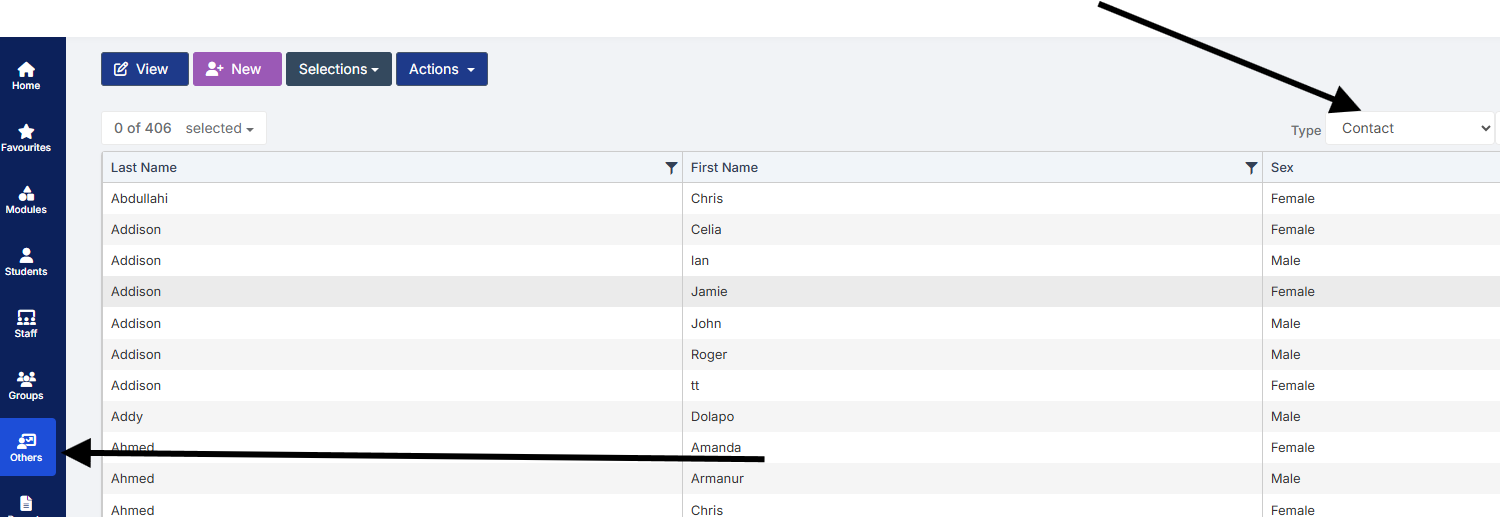
Double click on one of the duplicated contact records and remove the student from the Linked Student tab.

How useful was this article?

Click on a star to rate it!

Average rating / 5. Vote count:

No votes so far! Be the first to rate this post.

Similar Posts

  • Bromcom: Updating Staff Current Job Title

    To update the staff current job title in bulk go to Staff > Selection > Select All and then Actions > Manual Data Export. From here select “Basic Details” and tick “Include empty records where data does not exist” and click Export Open the spreadsheet that has been downloaded and enter all required information. After…

  • How do I split equipment in Equipment Register?

    Focus > Equipment > Highlight the equipment you would like to split > Click view/edit. Click the  icon (top right) Option 1 – Create one new record – Create one new record by splitting a number of items from the original quantity. Enter the number of items to be split from original quantity The new equipment…

  • BROMCOM: How can I transfer a Dinner Balance to a Running Balance Club Balance?

    Modules>MCAS.View>View Balances.  Select the student and then click on “Transfer” and enter the transfer details.         How useful was this article? Click on a star to rate it! Submit Rating Average rating / 5. Vote count: No votes so far! Be the first to rate this post.

  • Bromcom Finance: How do I add a Fund code?

    Modules> Finance> Homepage> Maintenance>Fund Codes Click New as shown in the below screen shot to create your chosen fund code Please also see guidance on Fund allocation How to allocate Funds How useful was this article? Click on a star to rate it! Submit Rating Average rating / 5. Vote count: No votes so far! Be…

  • Bromcom: Why can’t I see all of the exam seasons?

    This maybe due to your data boundary. Check under your account profile by going to your photo in the top right-hand corner of the MIS, My Account > Current Interval.   Data Boundaries are used to define what Staff can view in relation to current and historic Student Data, for example External Staff may only require the Current Years Data.   From the…