BROMCOM: Which report best allows you to see students/families who owe Dinner Money?
Reports>Dinner>Overdrawn Dinner Account
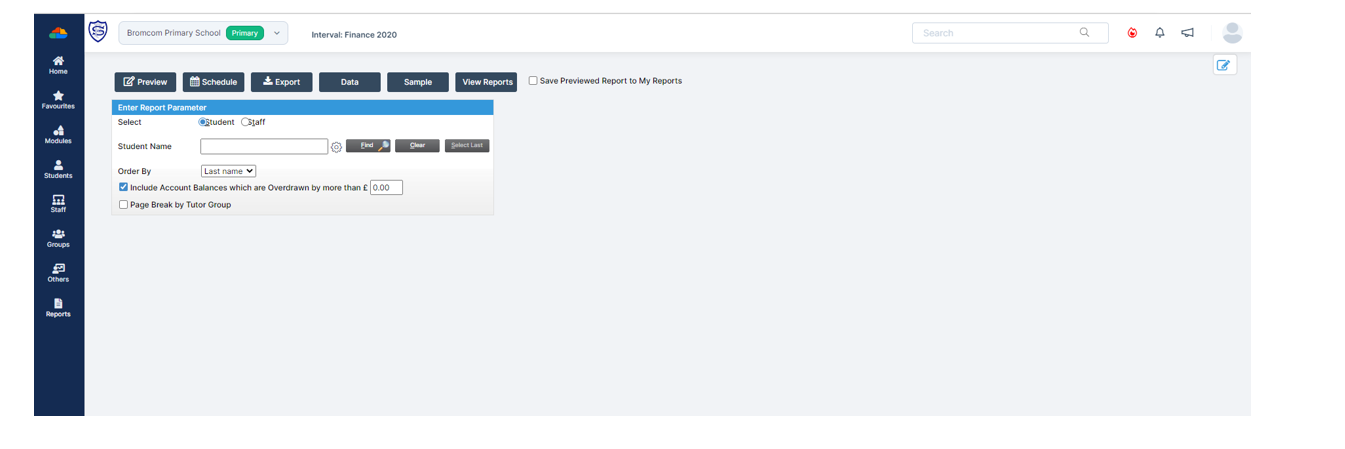
Reports>Dinner>Overdrawn Dinner Account
How useful was this article?
Click on a star to rate it!
Average rating / 5. Vote count:
No votes so far! Be the first to rate this post.
Data Boundaries are useful during End of Year – but can sometimes cause confusion. A Data Boundary is created in Config > Setup > Data Boundaries. You set a start and end date for the boundary as well as the roles this is available for. The user can select which data boundary they are in…
You can do this in: Config>Dinner>Meal Definitions How useful was this article? Click on a star to rate it! Submit Rating Average rating / 5. Vote count: No votes so far! Be the first to rate this post.
MyChildAtSchool (MCAS) can be used to give parents/guardians access to data collection sheets. In this KB we’ll show you how to configure data collection sheets both for current students, and preadmissions. Navigating To The Settings You can configure data collection sheets under Config>MyChildAtSchool>Students And Contact Details Settings Form Permissions In the Students And Contact Details…
Pre-Admissions in Bromcom Attached is a brief guide on how to carry out the following tasks with regards to Pre-Admissions; Creating a Pre-Admission Group Adding Students Manually Adding a student Via CTF/ATF Communication Using MCAS to share/collect information Sending Messages to parents Managing Admissions Finalise Admissions/Admitting Students Bromcom Pre-Admission documentation How useful was this article?…
Modules > Finance> Homepage> Individual Salary payments The most common reason why the “Save & Post button is greyed out is because you may have zero value lines See example screen shot below: To resolve the issue, simply highlight the payment line in the right hand column and either add a value or delete, you…
In Bromcom it’s possible to record attendance for Clubs, in this KB we’ll show you how this is done. Navigating to the Clubs Homepage In Bromcom, click the Groups button, this will default either to Tutor or Class. In the top right corner of the screen change the Group Type to Clubs Recording Attendance Select…