DEVON ONLY: DTSApps account code changes
From 13th April 2026 DTSApps will be globally configured to download all files with the new account codes.
If you have any files that need to be imported into the 2025 financial year you will need to manually turn this toggle off before downloading any files to ensure the files still include the 2025 ledger codes.
This can be done within DTSApps by going to School Setting > Note Settings and turning “Use Account Code in Reconciliation Files” off. You can then download the files and import into the 2025 financial year within Bromcom as normal.
PLEASE NOTE: You will need to turn this toggle back on again before downloading any 2026 files.
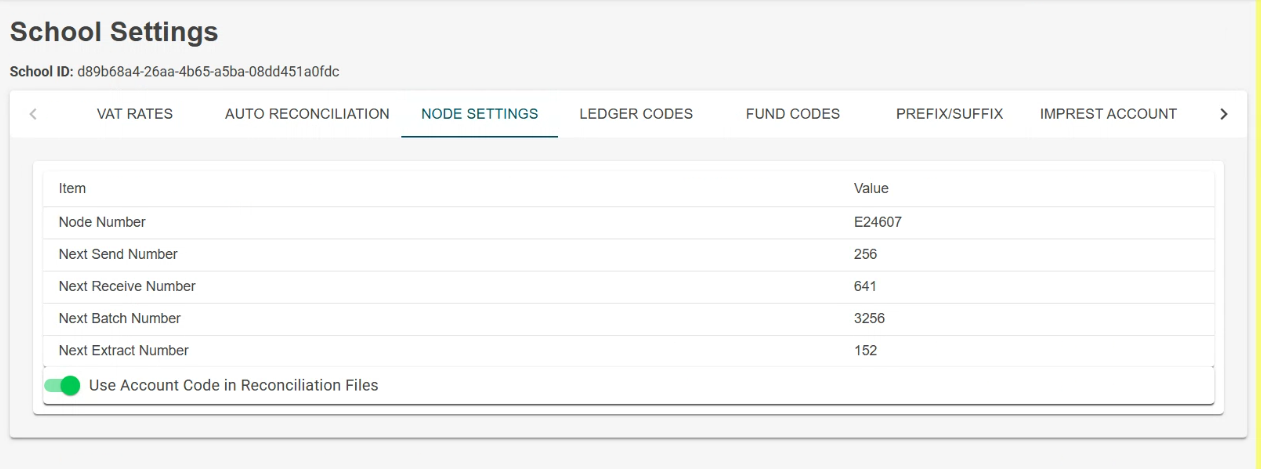
If you have already downloaded 2025 files without turning this toggle off please do the above and then re-download the file making sure you put a 2 on the end of the file name. If you have already tried to import into Bromcom you will need to delete the failed items and then import the newly downloaded file.
If you have any further issues please contact the Service Desk on 01392 385300 or via scomis@devon.gov.uk