| |

How to securely clean a Hard Drive using Data Wipe disk

USE THIS AT YOUR OWN RISK – DATA WILL NOT BE RECOVERABLE AFTER FOLLOWING THIS FAQ.


If you need to securely remove all data from a computers hard drive before reusing or disposing you can use the DataWipe CD-ROM.


Download the zipped ISO DataWipe for burning to disk

Or

The latest version can be found here at DBAN website 


Using the Data Wipe CD-ROM

This is a bootable CD, place it in the disk drive of the machine you would like to clean then turn it on and choose to boot from CD/DVD drive (methods of choosing a boot location vary between machine makes).

Once the CD has booted you will be presented with the following screen:
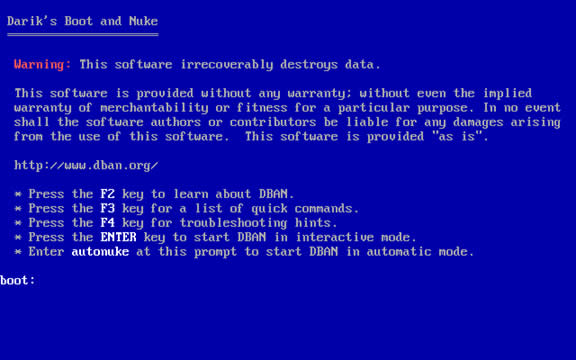
Fig1

Where it displays boot:, type autonuke and press enter.
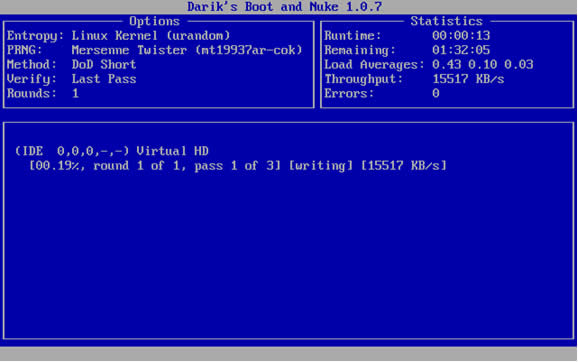
Fig2The data wipe process will then start, it should not be interrupted as this will result in partially deleted data.

An estimated time remaining will appear in the top right of the screen. Once the data wipe has finished you will be prompted to remove the CD and turn off the machine.

The computer will now be ready to be reused or disposed of.


Reviewed on 01/08/2019

How useful was this article?

Click on a star to rate it!

Average rating / 5. Vote count:

No votes so far! Be the first to rate this post.

Similar Posts

  • How to connect a Google Chromebook to a Wireless Network.

    To connect your Google Chromebook to a Wi-Fi or Wireless Network. 1: Start up the Chromebook. 2: Click on the Network icon in the lower left hand corner 3: If no networks are listed then first check that the Wireless Connection is enabled, then click on the words ‘No Network’. 4: This will now display…

  • I would like to add a network printer to my workstation.

    To add a network printer go to the start menu and click on printers and faxes.

    On the printers and faxes screen right click on an empty part of the window and choose Add Printer and then click next.
    Click on Network printer or a printer attached to……

  • How do I choose a default printer?

    Windows 7 – Go to the start menu – Devices and Printers use the right mouse button on the printer you wish to choose and from the list choose Set as default printer. Your default printer will be identified by having a tick on the bottom left of its icon. Windows 10 – Go to the start menu –…

  • How to setup Outlook 2007 for Easymail

    Video guide how to setup Outlook 2007 to be the email client for SWGFL EasyMail.
    Click the link to watch.

  • How to tell what version of OS X is on your Apple Mac Computer.

      The Apple Operating System, called OS X, is regularly updated incrementally, rather than by a few major releases like Microsoft Windows. The most recent versions are: 10.6.x = Snow Leopard 10.7.x = Lion 10.8.x  = Mountain Lion   To tell which version you have: 1: Click on the Apple Icon in the top left…