Scomis Hosted Application Connector 2016 – Connection problem from Windows 8.1 RDP

Problem

Connection problem from Windows 8.1.

You may find the problems logging onto the Hosted Application Connector with Windows 8.1.
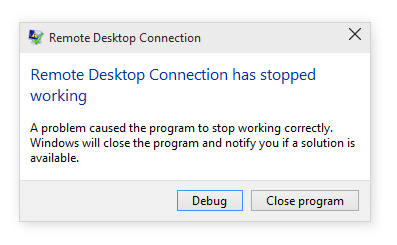
Image result for mstsc crash

Cause

Windows 8.1 is in extended support but has some limitations. We recommend updating to Windows 10 Pro as permanent fix.

Workaround

UDP connectivity in this version of the RDP (remote desktop protocol) can be disabled by adding the following registry key…

  • Open RegEdit from the Command Prompt
  • Browse to: HKLM\SOFTWARE\Policies\Microsoft\Windows NT\Terminal Services\Client
  • Add REG_DWord (32bit) “”fClientDisableUDP
  • Set the value to 1

Please note: If this FAQ is applied to a private home computer, Scomis is unable to provide support.

kb11685 11685

How useful was this article?

Click on a star to rate it!

Average rating / 5. Vote count:

No votes so far! Be the first to rate this post.

Similar Posts

  • How to remove a machine proxy

    Besides a user proxy which may be accessed via Internet Explorer>Tools>Internet Options there may be a proxy set on the machine itself. To find out open a command prompt and type:- netsh winhttp show proxy This usually comes back with Direct access <no proxy server> If, however, there is a proxy listed it can be removed by…

  • Favourite Links in Explorer

    How add a Favourite link for customers who access the Scomis Hosted Applications Service.

  • NovaT6 required user name on Terminal Server

    NovaT6 will prompt for a username and password on the Hosted Terminal Server if the user has launched NovaT6 from a custom shortcut.

  • Print from Microsoft Edge

    The Scomis Hosted platform now utilises Microsoft Edge as its Internet Browser. Previously, in Internet Explorer 11, there was a “Print ” button showing in the toolbar at the top of the page. Due to the way that Edge works, this is no longer possible. To bring up the Print Preview and dialogue window, simply…

  • How to access Schoolcomms sclog file on Hosted Applications

    This is a file which Schoolcomms sometimes request from a school. It can be found using File Manager in:- F:\Public\SchoolComms\Schoolcomms\hosted username\ Take the most up to date log file (currently sclog-9.6K.log)   KB18893   How useful was this article? Click on a star to rate it! Submit Rating Average rating / 5. Vote count: No…

  • Supply Claims only printing one page

    When clicking print in Supply and getting the print diagloue box and clicking print again the printer only prints out first page, e.g. 1 of 5.