Windows 10 Creators Edition Update & Scomis Hosted Applications Launcher
We have become aware of an issue caused by the recent Microsoft Creators Edition Update to Windows 10 which has introduced a bug affecting some updated Windows 10 computer’s ability to establish a remote desktop connection, including to our Hosted Application service. Users are unable to connect to the remote session and receive the error message below
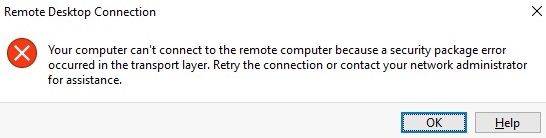
Your computer can’t connect to the remote computer because a security package error occurred in the transport layer.
You may also get the error.
“Your computer can’t connect to the remote computer because the Remote Desktop Gateway server is temporarily unavailable”.
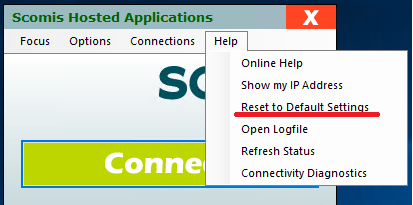
The first thing to try in this instance is clicking Help > Reset to Default Settings on your Scomis Hosted Applications Connector.
Microsoft have acknowledged this issue and are working on a patch to address it however we are not aware of the timescales for this.
Refer to FAQ – https://social.technet.microsoft.com/Forums/en-US/93be50d6-123a-4586-a327-1c8bf19d1545/windows-10-cant-connect-to-windows-2008-r2-rd-gateway?forum=winRDc
First try and add the following register key to the computer experiencing the issue,
Click Start > RUN
REG ADD “HKEY_CURRENT_USER\Software\Microsoft\Terminal Server Client” /v “RDGClientTransport” /t REG_DWORD /d 1
If you are still experiencing this issue the following is the suggested workaround from Microsoft which we have confirmed addresses the issue;
“Replace the mstsc.exe and mstscax.dll library located in C:\Windows\SysWOW64\ with the “backup” files in “Windows.old\WINDOWS\SysWOW64” and in C:\Windows\System32\ with the “backup” files in “Windows.old\WINDOWS\System32”.
You will need to take ownership of the file and give Administrators Full control access to be able to replace it. Please backup the file you are replacing.”
kb18797