|

Bromcom Finance: How can I find my carry forward figures ?

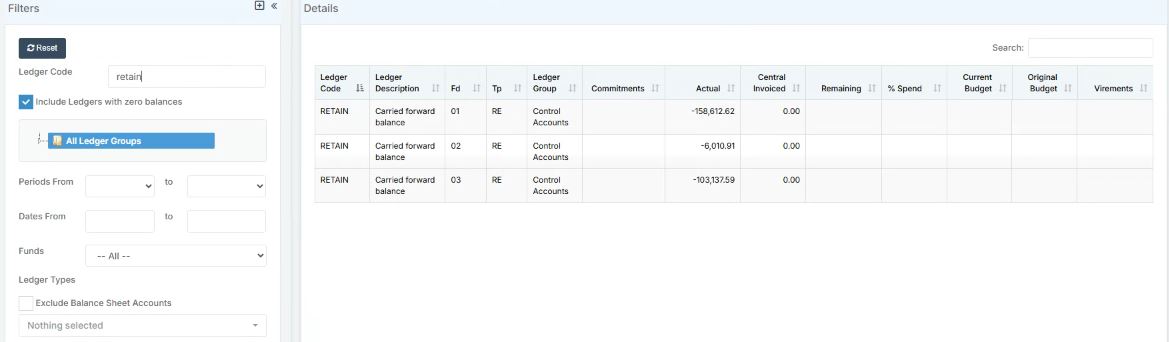
Devon LA have opted for “Retained earnings” to show in all schools databases.  This means the route for locating the previous years carry forward figures is as follows:

Previous year carry forward  E.G from previous financial year –  Financial year 23/24 – Please follow:

Modules> Finance> Homepage>> General Ledger> Chart of Accounts Enquiry

You can then search by ledger code for “Retained earnings” by typing in “RETAIN” in the search function on the left hand side menu and and press enter. You will then see the carry forward figures as per the example shown in the screen shot below :
 

Current carry forward figures – E.G carrying forward to next  Financial year 24/25 – Please follow:


Modules> Finance> Homepage> General ledger> Fund Review


How useful was this article?

Click on a star to rate it!

Average rating / 5. Vote count:

No votes so far! Be the first to rate this post.

Similar Posts

  • Recording Club Attendance in Bromcom

    In Bromcom it’s possible to record attendance for Clubs, in this KB we’ll show you how this is done. Navigating to the Clubs Homepage In Bromcom, click the Groups button, this will default either to Tutor or Class. In the top right corner of the screen change the Group Type to Clubs Recording Attendance Select…

  • Configuring Data Collection Sheets in MyChildAtSchool

    MyChildAtSchool (MCAS) can be used to give parents/guardians access to data collection sheets. In this KB we’ll show you how to configure data collection sheets both for current students, and preadmissions. Navigating To The Settings You can configure data collection sheets under Config>MyChildAtSchool>Students And Contact Details Settings Form Permissions In the Students And Contact Details…

  • BROMCOM: Devon County Council- Key Stage Upload dates

    The following dates have been provided by the Devon Data and Assessment Team. For further information please contact below Tel: 01392 287317 Email: Schooldataassessment@devon.gov.uk Your Key Stage CTF’s must be uploaded via Devon Transfer by the following dates. EYFS Deadline – 30th June 2025 Phonics- 23rd June 2025 (Please include Year 1 and Year 2…

  • BROMCOM: Where would you amend the cost of a school meal?

    You can do this in: Config>Dinner>Meal Definitions         How useful was this article? Click on a star to rate it! Submit Rating Average rating / 5. Vote count: No votes so far! Be the first to rate this post.

  • BROMCOM: Assessment – How to give access to Assessment Sheets (Marksheets) for a Head of Department/Head of School/ Teachers

    When creating your Assessment Template, (via Modules>Assessment>Manage Templates>New) as per How to Create an Assessment Sheet – Bromcom – Documentation Centre – you will have the options to associate your Teachers/HoD’s/HoY’s by using the flowchart below.  This has been designed to help you understand how to use Assessment Template Associations to generate/create Assessment Sheets. Please note, It is…

  • Bromcom Finance: How to process your invoices, in Central Authorisation and “Print & Export”

    Once you have added your invoices into Bromcom finance, you will need to authorise and batch up any invoices and credit notes created as follows : In Bromcom, navigate to Bromcom Finance Home page: 1) Click on Central Authorisation in the Routines area: 2) You will see any invoices and Credit notes that have been…