Bromcom – Readmit student

To begin, go to the Student List page.

From there, press Search Filters on the top right and change the Status to Leaver.
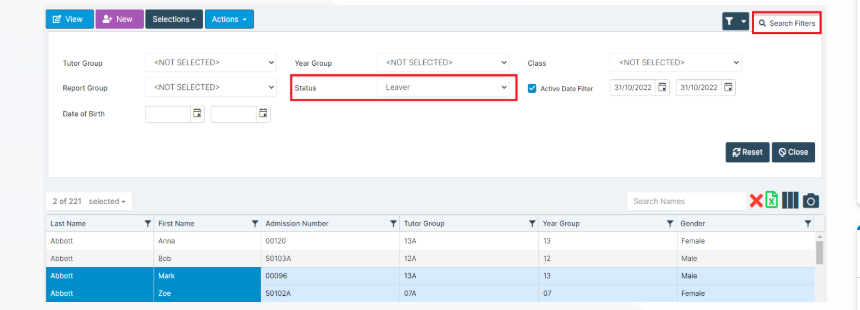
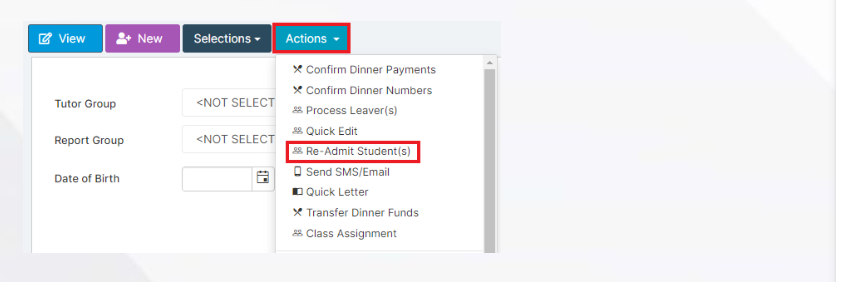
Now select the student/s that you wish to Re-admit and press Actions>Re-admit Student(s).

If you are Re-admitting multiple students, the Re-admit Date you select is going to apply to each student so please double check the dates you need before proceeding.
Further and full information can be found here: How to Re-Admit a Student – Bromcom – Documentation Centre

How useful was this article?

Click on a star to rate it!

Average rating / 5. Vote count:

No votes so far! Be the first to rate this post.

Similar Posts

  • Bromcom: How to enter marks into Key Stage DFE assessment marksheet

    Once you have opened your marksheet- BROMCOM: How to View Marksheets as a Teacher or Admin – Frequently Asked Questions you will need to enter your marks There are three ways to enter marks into Bromcom  You can enter marks by  clicking in each cell and entering the marks 1 by 1 Alternatively if you…

  • Changing file viewing options in Windows

    How to check that hidden files and folders, along with known file extensions, are displayed correctly.