|

Bromcom Finance: Previous year’s central payments and receipts are showing within the current financial year

This is expected functionality in Bromcom Finance.

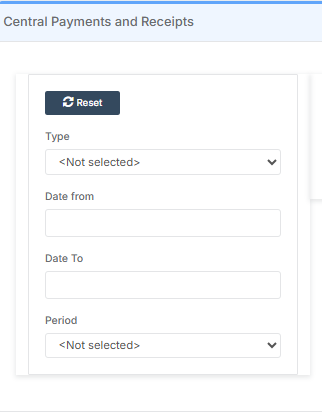
The Central Payments and Receipts page has no Financial Year filter on it so it will always show every single central payment and receipt entered.

There is a date range filter on the page on the left hand side which can be used to only see central payments and receipts entered during a specific date range.
How useful was this article?

Click on a star to rate it!

Average rating / 5. Vote count:

No votes so far! Be the first to rate this post.

Similar Posts

  • Bromcom – Readmit student

    To begin, go to the Student List page. From there, press Search Filters on the top right and change the Status to Leaver. Now select the student/s that you wish to Re-admit and press Actions>Re-admit Student(s). If you are Re-admitting multiple students, the Re-admit Date you select is going to apply to each student so please double check the dates you need before proceeding. Further and full information can be found here: How to…

  • Bromcom Finance: How do I map my classroom teacher to multiple funds?

    You may have a classroom teacher who works in nursery as well as the main school and is paid from multiple funds. This FAQ explains how to deal with this in Bromcom. You can also use this if a teacher is paid entirely from a different fund to your other teachers. Please see the following…

  • Bromcom Finance and DTSApps: How to process your invoice file PLYMOUTH SCHOOLS

    Once you have clicked “Print and Export” in Central Authorisation in Bromcom, you will need to process your TXT file through DTSApps Click here to log into DTSApps 2) If you work in more than one school, please ensure you select the DTSApps for the school you are processing the file for. 3) In the…

  • ARBOR – Quick Summary Guide – Pre-checks and Generating School Census

    This FAQ is a quick check list for updating information before Census.  For Schools wanting the latest documentation for Census and using Arbor – Click here  to jump to the relevant section. Census Date:   Thursday 2nd October 2025      DfE return date  Wednesday 29th October 2025 Dry Run opens 18th September 2025   PRE-CHECKS…