Bromcom: Asking for “PIN” when deleting a student record

You may be trying to delete a pupil and are being asked for your PIN? How do you find out what your user PIN is?
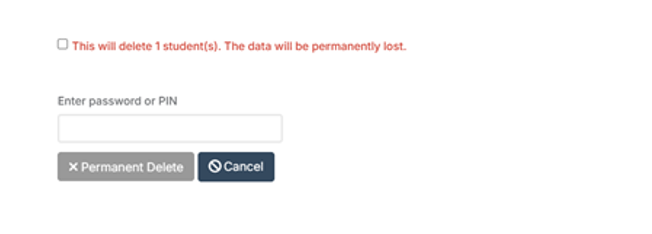
Request for a PIN usually means you’re an SSO user logging in with O365 or Google, and you were prompted to set your PIN number the first time you logged in with SSO.

Go to;

Others > Type dropdown: User Account > Find and select yourself > View.
Click Reset SSO Pin button across top (assuming you have relevant permissions)

Log out. Log back in. You’ll be prompted to make a new pin.


How useful was this article?

Click on a star to rate it!

Average rating / 5. Vote count:

No votes so far! Be the first to rate this post.

Similar Posts

  • Bromcom: Audit Report

    If there are changes to Bromcom data and clarification is needed on who/how or why this has changed you can run a detailed audit report on student and staff data. You can run this report via Reports>Administration>Audit Report This will confirm if this was a system or user change   How useful was this article?…

  • Bromcom Finance & DTSApps – PLYMOUTH SCHOOLS

    Bromcom Finance: How to process your invoices, in Central Authorisation and “Print & Export” Bromcom Finance: Raising orders on suppliers websites for example: YPO & Amazon Bromcom Finance: How to cancel “Passed for Pay” Invoices Bromcom Finance: I have clicked print and not print and export Bromcom Finance and DTSApps: How to process your invoice…

  • Bromcom Finance: How to add Base Pay Mapping?

    Please see the following guide on how to map your base pay: Modules> Finance> Homepage> Staff> Base Pay mapping Base Pay Mapping How useful was this article? Click on a star to rate it! Submit Rating Average rating / 5. Vote count: No votes so far! Be the first to rate this post.

  • Bromcom: How to see who has received MCAS push notifications

    To see who has received push notifications you can use Modules > Communication > Overview to see who push notifications have been sent to:         You can use Modules > MyChildAtSchool > Overview to review app installations:     Additionally there is an MCAS domain in Quick Reports for the school to…

  • BROMCOM: Where would you amend the cost of a school meal?

    You can do this in: Config>Dinner>Meal Definitions         How useful was this article? Click on a star to rate it! Submit Rating Average rating / 5. Vote count: No votes so far! Be the first to rate this post.

  • My laptop won’t turn on and there are no lights turning on/flashing

    1. Insert a battery from another (same model) laptop that you know is working.
    2. Try with just the cable attached, remove the battery.
    3. Try with a different power cable, this can be split into 2 parts so can be interchanged with the one that isn’t working to see if it a specific part of the cable