|

Bromcom Finance: How can I find my carry forward figures ?

Devon LA have opted for “Retained earnings” to show in all schools databases.  This means the route for locating the previous years carry forward figures is as follows:

Previous year carry forward  E.G from previous financial year –  Financial year 23/24 – Please follow:

Modules> Finance> Homepage>> General Ledger> Chart of Accounts Enquiry

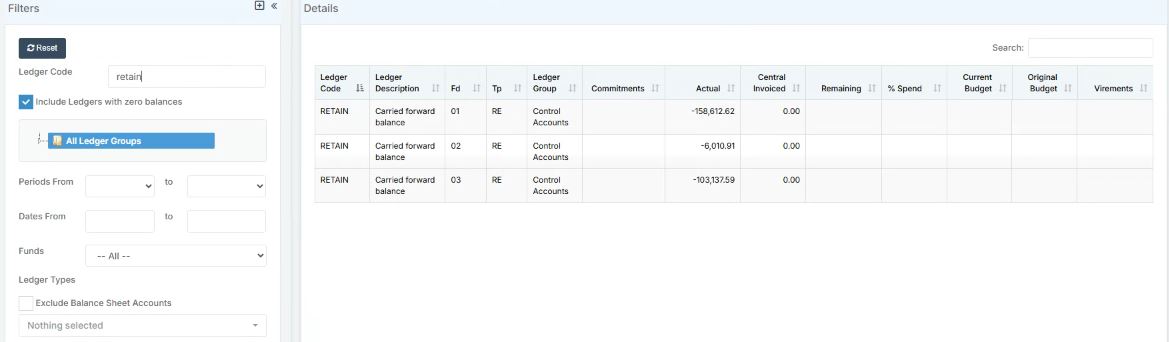
You can then search by ledger code for “Retained earnings” by typing in “RETAIN” in the search function on the left hand side menu and and press enter. You will then see the carry forward figures as per the example shown in the screen shot below :
 

Current carry forward figures – E.G carrying forward to next  Financial year 24/25 – Please follow:


Modules> Finance> Homepage> General ledger> Fund Review


How useful was this article?

Click on a star to rate it!

Average rating / 5. Vote count:

No votes so far! Be the first to rate this post.

Similar Posts

  • Bromcom Finance: How do I enter my budget into the new year ?

    Modules> Finance> Homepage>Budgeting> Cost Centre allocation. Top tip: When in Cost centre allocation, you can click “Edit Mode” located top right of screen, which opens all cost centres and ledger codes in one area for you to add your budget allocations. Please also see the following guide:Bromcom Finance guide – How to Enter Budgets  …

  • Third Party Application integration with Bromcom

    When looking to integrate a third party application, it’s best to liaise with the third party for more detailed instructions. The purpose of this guide is to explain how a new User Account can be created to give Third Party Supplier’s access to data in your MIS system through Bromcom’s API interface, which is required for all…

  • Troubleshooting Installing Scomis Open VPN External Connector

    Sometimes when installing the External Connector you will receive and error asking if the Clock on the computer is incorrect and the install will fail. You may get errors such as the following: “It is possible that your Clock is wrong and doesn’t match the Server Time.” “ERROR – Creating XMLRPC Object” To resolve this check the…

  • Bromcom Finance: How can I print my imported “Automatic Reconciliation file”

    Once in Modules > Finance> Homepage>Routines> Automatic reconciliation, please right click in the listing and then click export as shown in the screen shot  below.  This will then allow you to export to excel or csv and print as required.   How useful was this article? Click on a star to rate it! Submit Rating…

  • Finding your iPad’s MAC Address

    If your the wireless network you are connecting to is a Managed Network, then you will need to provide your Network Administrator with the iPad’s MAC Address. To obtain this first Tap on the Settings Icon… Once in the settings application, you will be in the General Screen as shown below: Tapping on About will…

  • End of Year Procedures 2025

    This FAQ lists the latest information regarding the End of Year procedures within Arbor and Bromcom. It contains all guidance notes required to carry out end of year procedures in your school. You must complete these procedures before the start of the new academic year.  Scomis is delivering Bromcom End of Year training on the…