|

Bromcom: How to show just statutory columns in a Key Stage Assessment marksheet

If you want your Key Stage marksheet to show only the statutory marks, you can filter this in some marksheets.

Go to Modules>Assessment>Assessment Sheets List
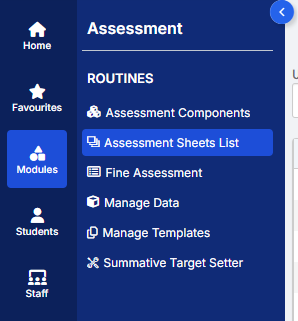
Browse to your chosen Key Stage marksheet, in this example we’ve chosen the Year 1 Phonics marksheet KS1-2025-01

In the top right of this marksheet click on the cog icon
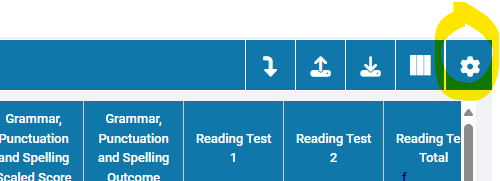
This opens the settings that allow you to select Statutory Marks only, tick this box and click Confirm.
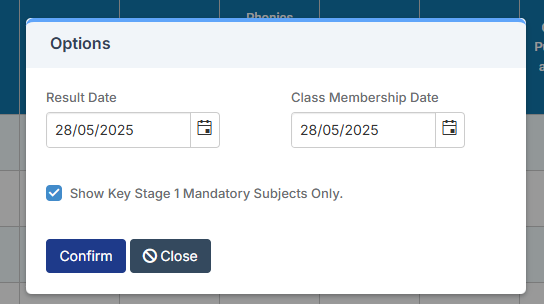
The marksheet should now only show the Statutory Marks.

Please note this option is not available for the Year 4 Multiplication Check marksheet.


How useful was this article?

Click on a star to rate it!

Average rating / 5. Vote count:

No votes so far! Be the first to rate this post.

Similar Posts

  • Adding Pupil Premium to your MIS

    Arbor ‘Pupil Premium Eligible’ in Arbor is an indicator of whether a student may be eligible for Pupil Premium based on their background, such as being in receipt of Free School Meals. The Pupil Premium tag may not be a true representation of who actually receives Pupil Premium funding in the school (shown by the…

  • Bromcom Exams: How do I import Exam Results into Bromcom

    Browse to Modules> Examination> Manage Results Click “Selections” button and click select all, or alternatively click and highlight the required students Click “Actions” button and click import results Any available results will then show that A2C have transferred to Bromcom Tick one line at a time,  and click “Import” button How useful was this article?…

  • BROMCOM: How to View Marksheets as a Teacher or Admin

    How to view the Marksheets for Key Stage Assessments in Bromcom, once the configurations has been complete: BROMCOM: How to add ‘Configurations’ to a Role for Key Stage – Frequently Asked Questions There are a few ways the Marksheets can be viewed in Bromcom for a Teacher: From the Homepage, go to Settings on the…

  • Bromcom: How to view Year 2’s Phonics results from when they were in Year 1

    If you need to view your current Year 2’s Phonics results from the previous year, you can do so using a report. Go to Reports on the left hand side menu, then Assessment and then Results by Pupil Use the find button to select all of your current Year 2 pupils Now select KS1 from…

  • Autumn School Census 2025 – Bulletin

    This FAQ lists the latest information regarding the School Census.  For Schools wanting the latest documentation for Census and using Bromcom – Click here  to jump to the relevant section. For Schools wanting the latest documentation for Census and using Arbor –  Click here  to jump to the relevant section. For Schools wanting the latest documentation for…