|

BROMCOM: Key Stage reports

There are a number of reports that can be run for Key Stage.

These can be used for analysis or to send to Parents/Guardians

You can find all of these reports from Reports>Assessment>Stage Assessment
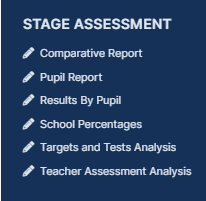
  • Comparative Report– This report can be used to analyse Test Scores and Outcomes in Percentages to compare against National Figures
  • Pupil Report – This is an individual Pupil report and can be sent to Parents to show a pupils Test Results and outcomes. You can also add free text to this report if Teachers or the Head Teacher wish to leave a comment.
  • Results by Pupil- This report shows a list of pupils and how they performed across Test Results and outcomes. This can be used for comparison across a Year or Reg group.
  • School Percentages – This report looks at test results across the school.  You can also add free text to this report if Teachers or the Head Teacher wish to leave a comment.
  • Targets and Tests Analysis- This report can be used to analyse test Scores and Outcomes by Student totals and a gender split.
  • Teacher Assessment Analysis- This report can be used to analyse Teacher assessment by Student totals and a gender split.


How useful was this article?

Click on a star to rate it!

Average rating / 5. Vote count:

No votes so far! Be the first to rate this post.

Similar Posts

  • Bromcom: Unable to register SSO

    When trying to Register SSO for a user within Modules > Setup > System Users an error may occur stating “Action Needed: Email address has already been registered”. This happens when an SSO User is deleted prior to the user being removed as SSO. Please ask the users to log into the below link and…

  • Disabling UAC in Windows

    The UAC – or User Access Control – is a feature of Windows7 & Vista to help protect you against Malware.

  • Bromcom: Exams – Common FAQ’s

    Please see the document attached for some common Bromcom Exam questions Exams – common FAQ’s How useful was this article? Click on a star to rate it! Submit Rating Average rating / 5. Vote count: No votes so far! Be the first to rate this post.

  • DEVON SCHOOLS ONLY – Submitting Claims through iTrent

    The employee is able to do this through self-service and you can then approve the claim once the system is available, or your administrators can input the claim on behalf of the employee via fast input, from a paper form. If you have administrators who are inputting from the paper process, please note the forms…