MCAS – Dinney money widget is missing to add payments
Parents are unable to see the “Dinner money” widget to add payments for their children.
Please check the following:
- Please ensure online payments is enabled via Config> MCAS> Online payments – Please also see How do I enable Bromcom Online payments in MCAS – SCHOOLS – Frequently Asked Questions
- Ensure the Dinner settings are setup via Config> MCAS> Dinner money. Please also see Setting up Dinner Money in Bromcom
- Ensure your pupil/students are assigned to a year group, if not please add them into their relevant year group
Once you have completed the above steps you should then be able to see the “Dinner money widget” you can do this my logging in as a parent via the students profile page and click the green person next to the parents name, this will then log you into MCAS and will display what the parent can see in MCAS
Please see the example widget.
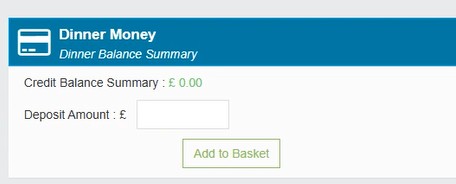
Please see the following guide on how parents can add payments via MCAS
How to add dinner payments in MCAS