Bromcom: Parent only seeing one child in MCAS

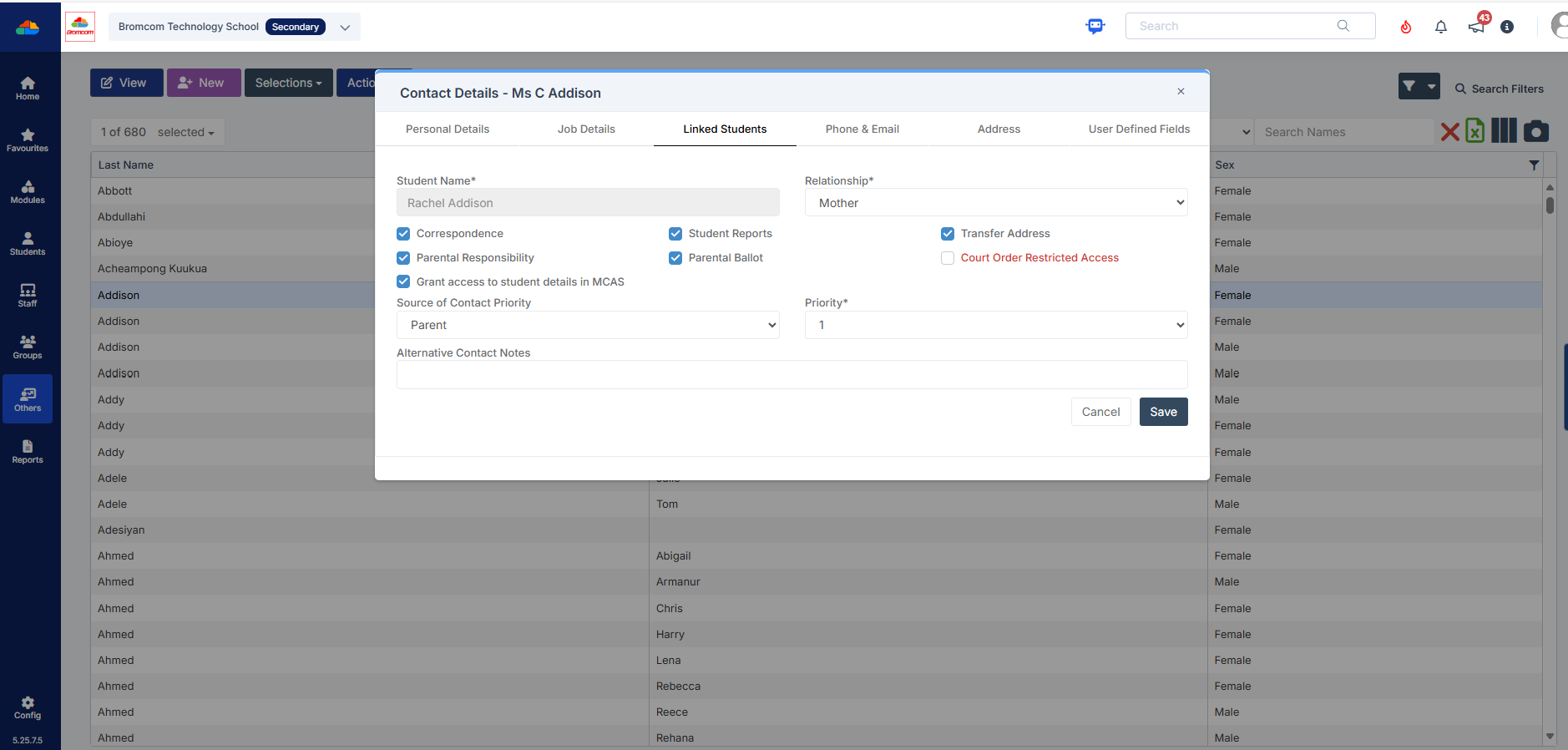
You may find that you receive queries from Parents as to why they can only see one of their children in MCAS.  This may be because “Grant access to student details on MCAS” is not ticked” within the contact record.

Please go to “Others”, Type: “Contact” and open the contact record.  Within “Linked Students”, double click on the contact, or select the pencil to open and check that “Grant access to student details in MCAS” is ticked.
How useful was this article?

Click on a star to rate it!

Average rating / 5. Vote count:

No votes so far! Be the first to rate this post.

Similar Posts

  • DEVON SCHOOLS ONLY – Submitting Claims through iTrent

    The employee is able to do this through self-service and you can then approve the claim once the system is available, or your administrators can input the claim on behalf of the employee via fast input, from a paper form. If you have administrators who are inputting from the paper process, please note the forms…

  • Bromcom: Updating Staff Current Job Title

    To update the staff current job title in bulk go to Staff > Selection > Select All and then Actions > Manual Data Export. From here select “Basic Details” and tick “Include empty records where data does not exist” and click Export Open the spreadsheet that has been downloaded and enter all required information. After…

  • Bromcom – Readmit student

    To begin, go to the Student List page. From there, press Search Filters on the top right and change the Status to Leaver. Now select the student/s that you wish to Re-admit and press Actions>Re-admit Student(s). If you are Re-admitting multiple students, the Re-admit Date you select is going to apply to each student so please double check the dates you need before proceeding. Further and full information can be found here: How to…

  • My laptop won’t turn on and there are no lights turning on/flashing

    1. Insert a battery from another (same model) laptop that you know is working.
    2. Try with just the cable attached, remove the battery.
    3. Try with a different power cable, this can be split into 2 parts so can be interchanged with the one that isn’t working to see if it a specific part of the cable

  • Bromcom Finance: Unable to search on Cost Centre & Ledger Code fields

    When adding purchase orders it isn’t possible to use any of the accounting search fields. If this is happening please check that your browser and the PC display itself are not on more than 100% on zoom, as well as no half screen or stretched mode etc. If this does not resolve the issue please…