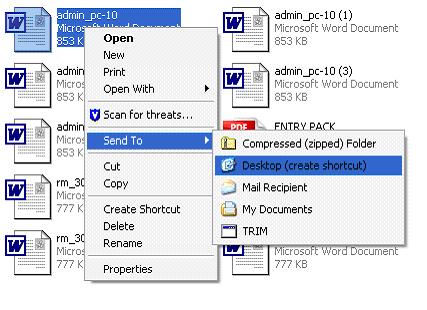
I want a shortcut to a file/folder I use regularly

  1. Find the folder/file
  2. Right click the file and follow the path to Send To – Desktop(shortcut) and click on this


Reviewed 16/02/2015

How useful was this article?

Click on a star to rate it!

Average rating / 5. Vote count:

No votes so far! Be the first to rate this post.

Similar Posts

  • How do I open an Elevated Command Prompt?

    I need to run a Command Prompt as a an administrator, how do I open an Elevated Command Prompt? There will need to be a user that has Administrative rights associated with the machine. Type cmd.exe into the search box on the Start menu. Right click on it and choose Run As or Run As…

  • How to securely clean a Hard Drive using Data Wipe disk

    USE THIS AT YOUR OWN RISK – DATA WILL NOT BE RECOVERABLE AFTER FOLLOWING THIS FAQ.   If you need to securely remove all data from a computers hard drive before reusing or disposing you can use the DataWipe CD-ROM.   Download the zipped ISO DataWipe for burning to disk Or The latest version can be…

  • Top 15 Windows 8 Shortcut Keys.

    Top 15 Windows 8 Shortcut Keys. With the changes made to Windows with the introduction of Windows8 and the new Metro tile interface some important items are no longer accessible in the same way as before. Below is a list of Windows8 shortcut keys that will allow users to find the most common features, information…

  • Trellix Anti Virus – Product Download

    Trellix AV Bundle Download –  Standalone Installable Release (Password Protected, please contact the Scomis Service Desk) This zip file contains the compressed files for Trellix Endpoint Security Standalone Install (ENS) Please read the documentation here : Trellix Agent 5.7 Installation Guide How useful was this article? Click on a star to rate it! Submit Rating…

  • How do I tell if I have Java installed and what version I have?

    How do I tell if I have Java installed and what version I have? Please follow the instructions below based on the operating system installed on your computer. Windows 8 Right-click on the bottom left of the screen and select Control Panel from the menu. Select Programs. Select Program and Features. If Java is installed…