| |

How to tell what version of OS X is on your Apple Mac Computer.


The Apple Operating System, called OS X, is regularly updated incrementally, rather than by a few major releases like Microsoft Windows. The most recent versions are:

10.6.x = Snow Leopard

10.7.x = Lion

10.8.x  = Mountain Lion


To tell which version you have:

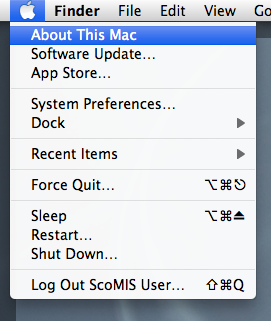
1: Click on the Apple Icon in the top left corner of your screen and select About this Mac.
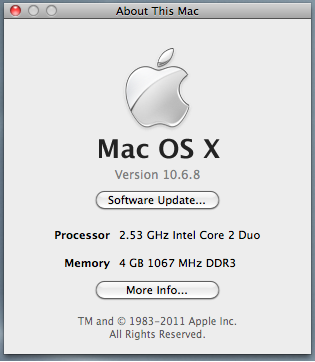
2: This will then display a screen similar to theone below – is this instance the version of OS X is 10.6.8 , also known as Snow Leopard.


Reviewed 17/08/2015

How useful was this article?

Click on a star to rate it!

Average rating / 5. Vote count:

No votes so far! Be the first to rate this post.

Similar Posts

  • Adding SWGfL Proxy Settings to mobile devices (iPad, iPhone, Android)

    Add SWGfL proxy server settings to my iPad or iPhone 1. Navigate to the ‘Settings’ app and tap on ‘WiFi’ 2. Next, tap on the WiFi network you need to add the proxy to. This should be one you are currently connected to. 3. This next page will display all of your network information, for the network you…

  • How to get a Google Chromebook’s MAC Address

    Some managed networks require that your wireless device’s MAC Address ( a unique identifying code) be added to a list of devices that have permission to join the network. To obtain the MAC address of your Google Chromebook…  1:  Start the Chromebook up.  2:  Click on the Network Icon in the corner of the screen….

  • Supply Claims only printing one page

    When clicking print in Supply and getting the print diagloue box and clicking print again the printer only prints out first page, e.g. 1 of 5.

  • SMART Board Activation Code

    Once you have installed the SMART Board software, you will require the following code to activate it.

    NB-AEBSI-BSRZN-C86Z8-WKCSR